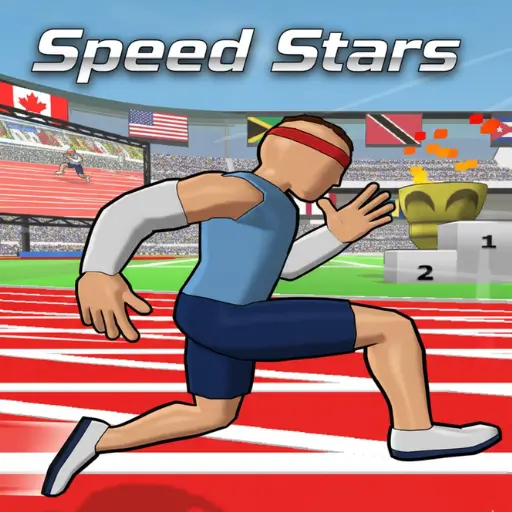
Speed Stars
Similar Games
Description
Introduction
The stadium lights flash, the crowd leans in, and your runner in Speed Stars launches forward with every tap you make.
This kid-friendly sprinting game is loved for its funny physics, fast races, and the thrill of beating your own best time again and again.
On gogamego.io, you can jump straight into the action with the Speed Stars browser version — completely free and fully unblocked for school and home.
Each race feels like a mini challenge: tap with perfect rhythm, keep your balance, and dash past your old records to climb the leaderboard.
- Play Speed Stars online instantly — no downloads, no logins.
- Enjoy Speed Stars unblocked anytime, even on Chromebooks.
- Kid-safe, fast loading, and perfect for quick racing fun.
Ready to sprint like a legend? Tap play and start your fastest run ever on gogamego.io!
🎮 “Speed Stars” – Game Snapshot
- Genre: Running, Racing, Physics-Based Sports
- Release Date: 2023
- Developer: Torcado
- Platforms: Browser (HTML5), PC, Mobile
- Modes: Solo Sprint, Time Trials, Online Leaderboards
What Is Speed Stars?
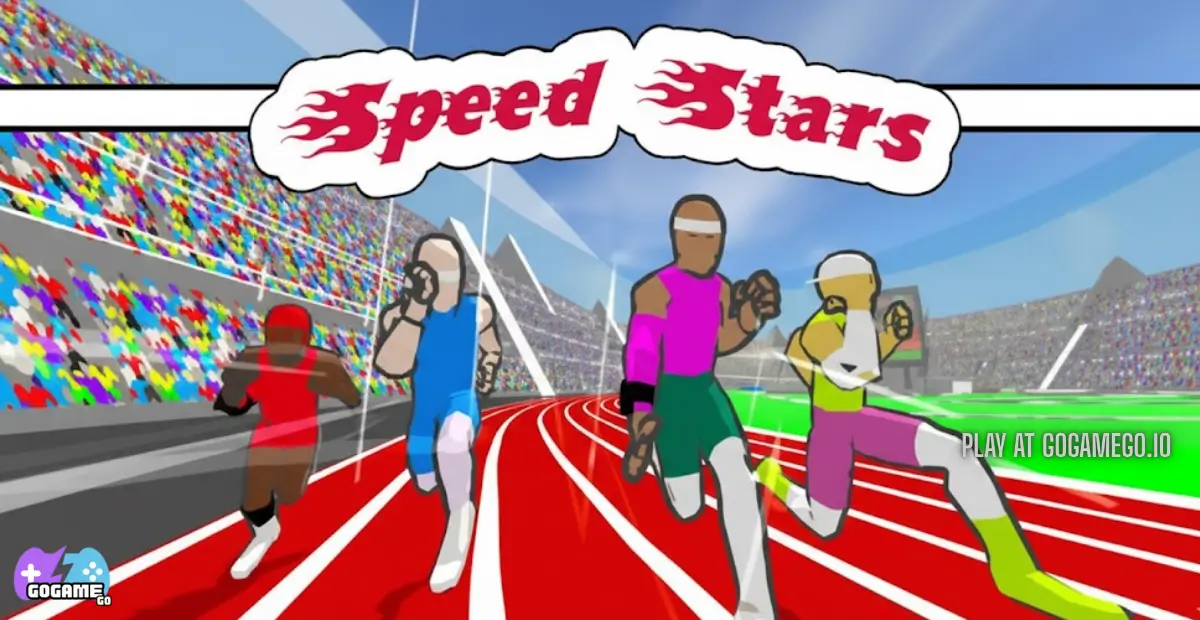
Speed Stars is a fast, funny, physics-based sprinting game where players tap to control every step their runner takes. Instead of simple button-holding, the game turns each stride into a challenge, making every race feel exciting, unpredictable, and super fun for kids.
The game was created by Torcado, an indie developer known for turning simple ideas into creative, skill-based games. Their style mixes playful physics with competitive gameplay, which is exactly why Speed Stars has grown into one of the most-loved running games online.
Originally released in 2023, the game continues to receive updates that make it smoother, faster, and more polished. Torcado often improves animations, adds new control tweaks, and keeps the leaderboards fresh so players always have new challenges to chase.
What makes Speed Stars special is how easy it is to learn but how tricky it is to master. Kids love the wobbly legs, the silly stumbles, and those perfect runs where every tap feels lightning-fast. It’s a pure “just one more try” experience.
The reason Speed Stars is trending right now is simple: it’s quick to play, super competitive, and loads instantly on gogamego.io with no downloads. Players share their best times, race friends, climb global leaderboards, and feel that rush of beating their record—even if only by a millisecond.
Fun, challenging, and totally kid-friendly, Speed Stars has become a must-play racing game for anyone who loves fast reactions and big laughs.
Gameplay Overview
How to Play
Speed Stars is all about timing, rhythm, and quick reactions. Your goal is simple: guide your runner down the track as fast as possible without losing balance. Every step matters, and the challenge comes from syncing your taps perfectly so your athlete keeps building speed instead of wobbling or falling.
There are no complicated levels, but there is a natural progression system based on your performance. Each race helps you improve your personal best, unlock faster times, and climb the global leaderboard. Kids love chasing their “next record,” and every tiny improvement feels like a real victory. As your timing gets cleaner, your runner moves smoother, accelerating faster and helping you reach those top-tier milestones.
Controls
1-Player Mode: Tap alternating keys (usually left/right arrow or A/D) to move each leg. The faster and more even your taps, the faster your runner sprints. Keep an eye on your rhythm—uneven tapping can send your sprinter wobbling.
2-Player Mode: Each player gets a set of keys and races on the same device. It’s chaotic, super fun, and perfect for friendly challenges.
Touch Controls (Mobile): Players tap left/right sides of the screen to alternate steps. The touchscreen rhythm feels natural for kids, making mobile a great option for quick races.
Pro Tips
- Start slow, build speed: Gentle, steady taps at the beginning help keep your runner balanced.
- Focus on rhythm, not speed: A consistent beat is faster than frantic tapping.
- Watch the runner’s posture: Leaning too far forward or backward means you’re tapping unevenly.
- Use headphones: Many players match their tapping to background sounds or music for better timing.
- Practice short bursts: Quick 5–10 second runs help train your muscle memory.
- Stay calm near the finish line: Most stumbles happen because players speed up too fast at the end.
- Challenge friends: Racing someone pushes you to improve much faster.
- Replay your best runs: Watching your own technique helps you notice tapping mistakes.
- Switch fingers if tired: Alternating fingers on long play sessions keeps your rhythm cleaner.
Key Features
Speed Stars packs a set of fun, kid-friendly features that make every race exciting, challenging, and super replayable. Each mechanic is designed to help players build skill, test their timing, and enjoy quick bursts of action whether they’re at home or playing at school on gogamego.io.
- Rhythm-Based Running: Instead of holding a button, players tap each step. This makes racing feel skill-based and rewarding as kids improve their timing.
- Funny Physics Gameplay: The wobbly legs and silly stumbles keep things lighthearted, turning every mistake into a laugh instead of frustration.
- Online Leaderboards: Players can chase personal bests and compare times with others worldwide, giving them a big confidence boost each time they move up the ranks.
- 1-Player & 2-Player Modes: Solo mode helps kids practice at their own pace, while 2-player races create friendly competition and nonstop fun.
- Instant Browser Play: No downloads, accounts, or installs—perfect for Chromebooks and quick gaming breaks at school or home.
- Mobile & PC Compatibility: Smooth controls on touchscreen and keyboard let kids play on any device they have access to.
- Short, Fast Races: Each sprint takes only a few seconds, making it great for quick sessions and encouraging repeated attempts to beat a best time.
- Kid-Safe & Easy to Learn: Simple controls and a friendly design make the game accessible for all ages, even younger kids.
Game Modes
Speed Stars offers several exciting ways to race, giving kids plenty of choices depending on how they like to play. Each mode is built around fast sprinting, smooth timing, and the fun challenge of beating records—whether alone or with friends.
Solo Mode is the core experience. Players tap to control every step, building speed while trying to stay balanced. The difficulty increases naturally as you learn to run faster and keep a steady rhythm. Each finished run gives you a new personal time, and the reward comes from improving your best score and climbing the global leaderboard. Kids love seeing their progress and trying to shave off just one more second.
Multiplayer Mode lets players race against others online. Matchmaking pairs you with racers who have similar skill levels, keeping the competition fair and fun. Winning matches feels incredibly satisfying, and the challenge pushes kids to sharpen their rhythm and tapping accuracy.
Local Co-op is perfect for friends sharing the same device. Two players race using different keys on one keyboard. Setup is simple—pick your runner, place your hands on your controls, and sprint. It creates tons of laughs as both players try to keep balance while tapping as fast as they can.
Some versions of the game also include Tournament or Seasonal Events, where players compete for limited-time high scores or special badges. These modes keep the game fresh and give kids new goals to chase throughout the year.
No matter which mode you choose, Speed Stars makes every race feel intense, funny, and full of exciting moments.
Characters & Customization
Characters
Speed Stars keeps things simple and kid-friendly, but many versions of the game feature fun character variations that give each runner a playful personality. These characters don’t change the core gameplay, but kids love choosing the runner that feels “just right” for their racing style.
- Sprinter Sam: A balanced runner with smooth animations, great for beginners learning rhythm and timing.
- Rocket Riley: Known for fast acceleration, perfect for players who like explosive starts.
- Dash Max: A steady runner who focuses on long, clean strides, ideal for building strong finishing times.
- Turbo Tia: Light, quick, and super reactive—fun for advanced players who can maintain tight rhythm control.
- Flex Finn: A silly, wobbly character who makes every stumble hilarious, great for kids who enjoy the humor of the physics.
- Champion Jade: A visually strong and confident character, a favorite among players who love competitive leaderboard runs.
Customization
Even though Speed Stars focuses on racing, customization plays an important role in making the game feel personal. Kids can change outfit colors, pick fun themes, and choose different character looks to give their runner personality.
Outfits often include bright jerseys, sporty shorts, and stylish running shoes. Many players enjoy mixing colors to match school teams or favorite sports heroes. Some versions also include fun accessories like headbands, glasses, or neon accents.
While the game doesn’t rely on heavy gear stats, these visual upgrades make every race feel more exciting. The simple customization system encourages creativity and gives kids a chance to express themselves before hitting the track for another fast sprint.
Special Moves & Combos
Even though Speed Stars is built around simple tap-to-run mechanics, skilled players quickly discover a set of advanced “special moves” and tap combos that help them run faster, stay balanced, and shave precious milliseconds off their time. These moves are not official power-ups—they’re mastery techniques that come from understanding rhythm and physics. Kids love them because they turn every race into a chance to improve and pull off a “perfect run.”
- Perfect Rhythm Burst: A steady tap pattern at the start that prevents wobbling and builds clean acceleration. Strategy: count the first taps aloud or match them to a beat.
- Micro-Step Control: Tiny, fast taps used when the runner starts leaning too far forward. Strategy: use this to recover balance without losing too much speed.
- Power Stride Combo: Longer, evenly timed taps once your runner is fully stable. Strategy: transition to power strides around the halfway mark for max top speed.
- Late-Game Surge: A controlled tap increase during the final stretch. Strategy: only attempt this if your posture is perfect—otherwise you’ll stumble before the finish.
- Stumble Recovery Flick: Quick alternating taps when your athlete begins to trip. Strategy: stay calm and tap fast but evenly to reset balance.
- Speed Hold Zone: Maintaining your exact rhythm for 2–3 seconds to lock in top speed. Strategy: avoid looking at the timer; focus on the tap pattern instead.
- Two-Finger Switch Combo: Switching fingers mid-run to maintain speed during longer races. Strategy: great for players whose tapping rhythm slows down from fatigue.
- Lean Correction Tap: A slightly quicker tap on the side the runner is drifting toward. Strategy: this tiny adjustment keeps your character centered without wasting momentum.
Mastering these advanced moves turns every Speed Stars race into a thrilling skill test and helps kids climb the leaderboard faster than ever.
Tips & Tricks
Becoming a true champion in Speed Stars takes more than fast tapping—it takes smart timing, clean rhythm, and a few clever tricks that help you stay balanced while pushing for your fastest run ever. These tips give kids the perfect mix of simple strategies and advanced techniques to help them climb the leaderboard on gogamego.io.
- Warm up your rhythm: Before your first serious run, do a short practice sprint to get your tapping speed steady.
- Start with control, not speed: Many beginners tap too fast at the start and fall. Slow, even taps create a stronger long-term pace.
- Watch your runner’s lean: If the character tilts forward or backward, adjust your tapping rate to rebalance instantly.
- Use a counting pattern: Counting “1-2, 1-2” helps kids keep a perfect beat during sprints.
- Adjust tapping for track length: Short races need faster bursts, while longer ones require calm, steady tapping.
- Stay relaxed during fast runs: Tension makes tapping uneven. Keep your fingers loose and your breathing steady.
- Watch replays of top players: Studying their tap rhythm gives great insight into how experts stay balanced at top speed.
- Practice recovery tapping: If you feel a stumble coming, switch to tiny, fast taps for a second to regain stability.
- Use two-finger switching: Swap fingers mid-run to avoid getting tired and losing rhythm.
- Don’t rush the finish: Many players fall right before the line. Keep your rhythm clean all the way through the final step.
- Find the best device angle: Holding your phone or keyboard at a comfortable angle makes tapping smoother.
- Challenge friends for practice: Taking on real opponents builds focus and helps improve timing faster.
With these tricks in your pocket, every Speed Stars run becomes smoother, faster, and way more exciting.
Platforms & Technology
Speed Stars runs smoothly on almost any device thanks to its lightweight design and modern browser technology. It works perfectly on Chrome, Firefox, Edge, and Safari, making it easy for kids to play at school or at home on gogamego.io without any downloads.
On desktop, players enjoy precise keyboard tapping for tight rhythm control, while mobile gamers get easy left–right screen taps that feel natural and fast. Both versions keep the gameplay identical, so your best times carry over no matter where you play.
The game is built using HTML5 and WebGL, which allows it to load quickly and deliver smooth animations, funny physics, and responsive controls across all devices—including Chromebooks.
For the best performance, close extra tabs, use a modern browser, and keep your screen brightness steady to reduce input lag. When everything runs smoothly, Speed Stars feels lightning-fast and incredibly fun.
Can I Play Speed Stars Unblocked?
Yes! You can play Speed Stars unblocked anytime on gogamego.io. The game runs directly in your browser, meaning there are no downloads, no installs, and no hidden ads getting in your way. Kids can jump into a sprint instantly whether they’re at school, at home, or even on a school Chromebook.
Because Speed Stars is built with safe, lightweight technology, it loads easily on networks that normally block gaming sites. This makes it a perfect choice for quick breaks during computer class, study hall, or free time at work.
Just open gogamego.io, tap play, and your runner is ready to charge down the track. It’s one of the smoothest and safest ways to enjoy Speed Stars online—completely unblocked and always free.
Similar Games
If you enjoy the fast races and skill-based timing in Speed Stars, you’ll love these other free, kid-friendly games on gogamego.io.
All of them are unblocked, browser-based, and perfect for quick play at school, work, or home.
- Vex 3 – Stickman parkour with tight jumps, traps, and speed runs that reward precision and quick reactions.
- Flip Bros – Fast action platformer where every flip turns into a powerful mid-air attack and combo opportunity.
- Handulum – Physics rope-swinging game that trains timing, momentum control, and careful planning.
- Candy Jump – Simple tap-to-jump arcade fun focused on rhythm, high scores, and quick reflexes.
- Knife Hit – One-tap timing challenge where you throw knives, slice targets, and test focus under pressure.
- MineFun io – Creative block-building and multiplayer adventures for kids who love exploring online worlds.
- Happy Glass – Cute physics puzzles that build problem-solving skills through draw-and-fill challenges.
- Bloxorz – Classic logic puzzle where you flip a block through tricky mazes and brain-teasing levels.
- Avatar World – Relaxed creative play with characters, homes, and worlds that kids can customize and explore.
Game History & Updates
The first version of Speed Stars launched on December 16, 2020, for PC via Steam, where it was developed by Luke Doukakis and published under his own name. Since then, the game has steadily evolved with both minor updates focused on bug fixes and more significant patches that added new race-distances, customization items, and improved physics visuals.
Over time the community around Speed Stars grew through Steam forums, Reddit discussions, and browser-game portals. On Reddit, the developer interacted with early players, gathering feedback on timing mechanics and customization. The PlayTracker stats show thousands of owners and active interest, underlining that the game’s niche rhythm-based sprinting mechanic resonates with a dedicated audience.
As for the future, while no official roadmap has been publicly released, community requests suggest that players hope for features like live multiplayer races, additional long-distance tracks, enhanced customization and seasonal events. Past updates hint that the developer may continue improving device compatibility, refining controls on mobile, and expanding game modes to keep the momentum going.
FAQ
Is Speed Stars free to play?
Yes! Speed Stars is completely free on gogamego.io. You can jump in instantly with no downloads, no sign-ups, and no hidden costs.
Can I play Speed Stars unblocked at school?
Absolutely. The game runs directly in your browser, making Speed Stars unblocked on most school and work networks. It also works great on Chromebooks.
What is the main goal of the game?
Your goal is to sprint as fast as possible by tapping in a steady rhythm. Clean timing helps you climb the global leaderboard and beat your personal best.
Does Speed Stars have multiplayer?
Some versions include online races and local 2-player mode. On gogamego.io, you can enjoy fast solo runs and challenge friends using the same device.
Are there character upgrades?
Speed Stars focuses more on skill than stats, but many versions include outfits, colors, and fun visual customizations that let you personalize your runner.
Does the game work on mobile?
Yes! Speed Stars works smoothly on phones and tablets. You use left-right screen taps instead of keyboard buttons, making it easy for kids to play anywhere.
Why does my runner keep falling?
This happens when your tapping rhythm is uneven. Try tapping in a steady left-right pattern and avoid going too fast too early in the run.
How can I get faster times?
Practice your rhythm, use micro-taps to regain balance, and save your sprint burst for the final stretch. Watching your character’s posture also helps a lot.
Is Speed Stars safe for kids?
Yes! The game is clean, kid-friendly, and free of ads or unsafe content. It’s built for quick, safe gameplay at home and school.
Do my leaderboard scores save?
Many versions track your best times automatically. As long as you play on the same device, your top records will stay saved.
Conclusion
Speed Stars is one of the most exciting and kid-friendly racing games you can play online, combining simple tap controls with a fun physics challenge that keeps every run fresh. Whether you’re practicing your rhythm, racing friends, or pushing for your fastest time ever, the game delivers quick, satisfying action that anyone can enjoy. Its smooth browser performance, unblocked accessibility, and safe, ad-free gameplay make it perfect for school, home, and anywhere in between.
With multiple modes, customization options, and a growing community of players chasing high scores, Speed Stars continues to shine as one of the best sprint games on the web. The more you play, the better your timing gets—and the more rewarding every finished run feels.
Ready to jump in? Head to gogamego.io, tap the play button, and start your fastest sprint yet. Your new personal record is waiting—let’s see how far you can run!