
Five nights at winstons
Similar Games






Description
Introduction
Five nights at winstons brings a playful twist to spooky school adventures, turning every hallway into a mystery and every shadow into a surprise. Kids love it because it feels exciting, silly, and a little bit scary — just the right amount for fun.
On gogamego.io, you can jump into Five nights at winstons completely free and unblocked, making it super easy to start playing right away. No waiting, no downloads — just instant action.
As the brave night watcher, your job is to keep an eye on the school cameras and outsmart the goofy, sneaky characters wandering around after dark. Each night gets trickier, pushing your focus, timing, and courage to the limit.
If you enjoy kid-friendly horror games, school survival challenges, or anything inspired by the classic FNAF style, this is your perfect pick. Get ready to click “Play” and see how long you can last in the funniest night shift you’ll ever take on.
🎮 “Five Nights at Winstons” – Game Snapshot
- Genre: Kids’ Horror, School Adventure, Survival
- Release Date: Fan-made release (varies by version)
- Developer: Winston Creative Studio
- Platforms: Browser (Free & Unblocked), PC (Fan Builds)
- Modes: Single-Player Survival
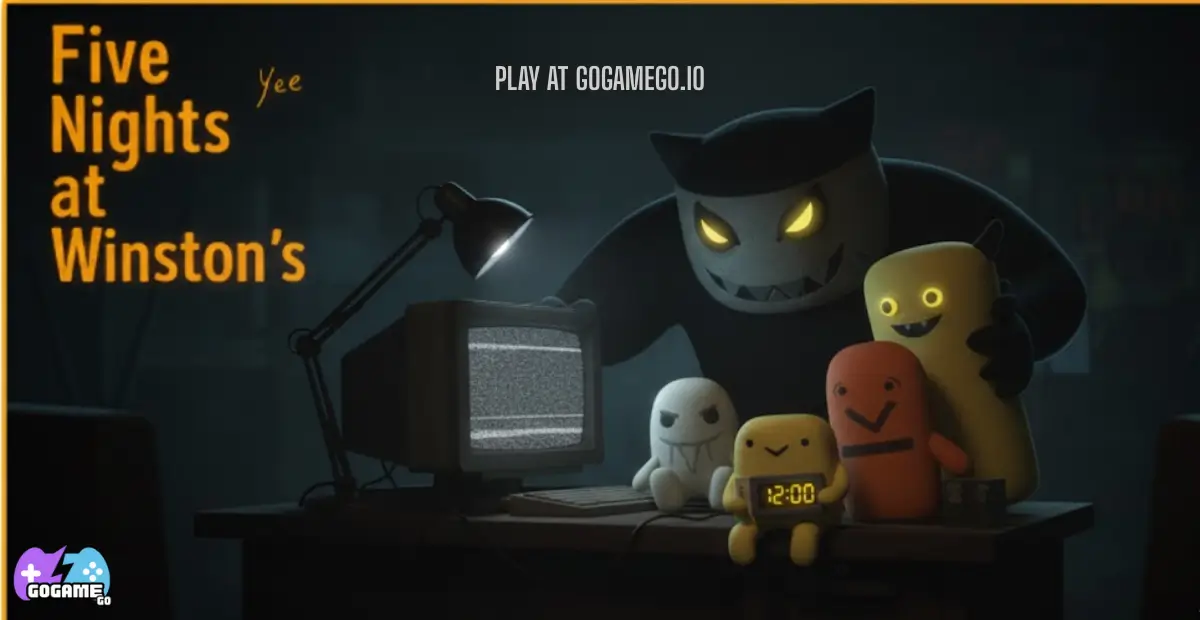
What Is Five Nights at Winstons?
Five Nights at Winstons is a kid-friendly spooky adventure where players step into the role of a nighttime school guard trying to stay safe until sunrise. Instead of terrifying monsters, you’ll face goofy, quirky school-themed creatures that sneak around the halls, pop up on cameras, and try to surprise you in silly ways. The mix of gentle jumpscares, colorful characters, and simple controls makes it perfect for young players who enjoy a light horror feel without anything too intense.
The game comes from the small indie team at Winston Creative Studio, a group known for creating playful, safe-for-kids games with fun storytelling and lovable characters. Their focus has always been on making spooky experiences feel exciting, not frightening, and Five Nights at Winstons follows that tradition beautifully.
The original fan version appeared several years ago, and new updated builds keep popping up with improved visuals, smoother gameplay, and extra nights or bonus challenges. Each version adds something fresh while keeping the same charming school-night-survival style that fans adore.
Its unique appeal comes from the way it blends a school setting with FNAF-inspired mechanics, turning familiar classrooms and hallways into a playful maze of surprises. Kids love the balance of mystery, humor, and strategy.
The game is trending right now because creators and players on YouTube and TikTok keep sharing funny reactions, character theories, and night-survival challenges. This wave of attention has helped Five Nights at Winstons grow into one of the most popular kid-safe spooky games online.
Gameplay Overview
Five Nights at Winstons delivers a fun, slightly spooky school-night challenge built for kids who enjoy mystery, strategy, and quick reactions. Your main goal is simple: watch the cameras, track the silly creatures sneaking through the hallways, and keep them from reaching your door. Each night becomes a little harder, pushing you to think faster, manage your power wisely, and stay calm even when a goofy face pops up on-screen.
The game uses a night-by-night progression system. Every new night introduces faster movement, trickier patterns, and sometimes new characters. Instead of rewards like coins or skins, your biggest prize is unlocking the next night — and proving you’re brave enough to outsmart the entire Winston School. The higher your night level, the more bragging rights you earn among friends. Some versions include bonus modes or custom nights where you can adjust the difficulty and practice your skills.
How to Play
Your main objective is to survive until the clock hits 6 AM. Use your cameras to track characters, close doors to block their path, and conserve power so you don’t get stuck in the dark. Staying alert is the key — every sound, movement, or blink on the screen matters. If something goes quiet, it usually means a creature is getting closer.
Controls
1-Player Mode:
• Mouse or touch: Switch camera views
• Click or tap: Close/open doors
• Spacebar or button: Toggle lights
Touch Controls (Mobile):
• Tap screen edges: Change camera rooms
• Tap door icons: Close or open doors
• Tap light icons: Turn hallway lights on/off
2-Player Mode (if available in some fan versions):
• Player 1: Cameras & lights
• Player 2: Doors & power management
Pro Tips
- Check side cameras more often — creatures love sneaking in from blind spots.
- Don’t keep doors closed too long; power drains fast.
- Listen for movement cues — audio clues save more power than camera scrolling.
- Switch cameras in a pattern to avoid missing quick-moving characters.
- Use lights only when you think something is near the door.
- Save your strongest focus for the last hour — creatures get speedy.
- Watch power levels carefully; staying calm helps prevent panic-clicking.
- Practice earlier nights to learn character routines.
- Keep your cursor near important buttons for faster reactions.
- If a room looks too quiet, double-check it — silence is suspicious.
Key Features
Five Nights at Winstons packs a playful mix of strategy, suspense, and kid-friendly scares, making it one of the most enjoyable school-themed survival games online. Every feature is designed to keep young players engaged while still being easy to understand and master.
- Interactive Camera System: Players can switch between different school rooms to track characters. This teaches awareness and boosts quick decision-making skills.
- Simple Door & Light Controls: Kids can easily block characters or light up dark hallways with one click or tap. The benefit is smoother gameplay that even younger players can enjoy without confusion.
- Night-by-Night Difficulty: Each night becomes slightly harder, helping players build confidence as they learn patterns and improve their timing.
- Fun, Goofy Characters: Creatures are designed to be spooky but silly, offering safe excitement without being too scary. This makes the game perfect for children.
- Power Management System: Players must conserve energy, teaching resource management and patience — skills that help them think before clicking.
- Kid-Friendly Horror Atmosphere: Vibrant visuals and light jumpscares create a thrilling experience without crossing into anything intense or unsafe.
- Browser-Based & Unblocked: No downloads, no installs, and no restrictions. Kids can play instantly, which increases accessibility and keeps them engaged longer.
- Replay Value: With random movements and different strategies each night, the game stays fresh and exciting every time you play.
Game Modes
Five Nights at Winstons offers a variety of fun, kid-friendly modes that let players enjoy the spooky school adventure in different ways. Each mode adds its own twist, giving the game lots of replay value whether you play alone, with a friend, or as part of a larger group. While the original fan game focuses mainly on solo play, many versions online and on fan platforms introduce extra modes to make the experience even more exciting.
Solo Mode: This is the classic way to play. You control everything — cameras, doors, lights, and power. The difficulty rises each night, making later levels faster and trickier. The reward is unlocking new nights, mastering character patterns, and proving you can survive until 6 AM without help. Solo mode builds confidence, sharp timing, and awareness.
Multiplayer Mode (varies by version): Some fan builds include online multiplayer, letting two players team up from different devices. One player handles cameras while the other manages doors and power. Matchmaking is usually quick, and this teamwork-focused mode helps kids develop communication and strategy as they coordinate moves under pressure.
Local Co-op: In certain versions, two players can play on the same screen. One uses the keyboard while the other uses the mouse or touch controls. This setup is easy to manage and turns the game into a fun cooperative challenge where both players contribute to surviving the night.
Tournament or Seasonal Modes (if included in some fan versions): Fan communities sometimes host survival challenges or seasonal events where players compete to last the longest night, complete special difficulty rules, or beat custom-night settings. These events add excitement and encourage friendly competition among young players.
Characters & Customization
Five Nights at Winstons features a playful cast of school-themed characters designed to be spooky in a silly, kid-friendly way. Each one has its own personality, movement style, and funny quirks that make every night feel fresh and unpredictable. These characters aren’t meant to frighten — they’re designed to surprise, entertain, and spark imagination.
Characters
- Winston the Hall Monitor: A tall, slow-moving character who patrols long hallways with a flashlight. He’s strict but goofy, and players can usually track him early because he hums loudly in the halls.
- Baby Winston: A tiny, fast character who loves hiding behind desks and lockers. His quick movements make him a challenge, especially during mid-game nights.
- Long Arms: Known for stretching between doorways, this character moves quietly but appears suddenly on side cameras. His unique reach means players must check edges more often.
- Weird Climber Dude: A playful character who climbs walls, ceilings, and sometimes pops directly into upper camera angles. His unpredictable routes make him exciting to watch.
- Eraser Beast: A silly creature made of school erasers that hops around noisily. Kids love him because his movements are funny and easy to track.
Customization
Some fan versions of Five Nights at Winstons include light customization options to make the experience feel more personal. Players can change interface colors, adjust camera themes, or swap door and button styles for a more playful look. A few fan builds even offer character skins, upgraded visuals, or new sound effects that make each night feel different.
These customization choices let kids tailor the game to their style — brighter colors for fun, darker tones for mystery, or themed icons for school events and challenges. Even small changes can make every session feel fresh and exciting.
Special Moves & Combos
Even though Five Nights at Winstons is a kid-friendly survival game, many fan versions include fun “special moves” and combo actions that help players handle tricky moments during the night. These moves add excitement, give players more control, and make strategy a bigger part of the experience. Each move has its own purpose, timing, and best moment to use it — helping young players think ahead and react wisely.
- Quick-Cam Flip: A fast switch between two key camera rooms. This move helps you track speedy characters like Baby Winston without wasting power. Use it when you hear sudden movement.
- Double-Door Tap: A technique where you quickly tap both doors to check responsiveness and scare away nearby characters. It saves energy compared to keeping a door closed too long.
- Hallway Flash Burst: A quick light burst that reveals hidden characters. It’s great for spotting Long Arms before he reaches your doorway. Use it only when footsteps sound close.
- Steady Scan Combo: A camera-check pattern that covers left, center, and right rooms in order. This keeps you aware of all approaching characters and prevents surprise visits.
- Silent Hold: Waiting motionless for a moment without switching cameras. This is useful when the power is low, helping conserve energy during the final hour.
- Power Shuffle: A strategic rhythm of switching cameras and lights without over-tapping. This helps avoid panic moves and teaches better timing during intense moments.
- Corner Look Combo: A technique where you flash the lights, check the side cameras, then return to the main screen. It’s excellent for managing two characters at once.
- Final-Hour Burst: When the last in-game hour begins, players switch to rapid checks of the most active rooms. This combo boosts survival chances when characters are at their fastest.
Using these moves wisely makes the game more exciting and helps kids build confidence as they master their own survival style.
Tips & Tricks
Mastering Five Nights at Winstons becomes even more fun when you learn how to think ahead, stay calm, and make smart choices during each night. These tips are designed to help kids feel confident, improve their reaction time, and enjoy every spooky-silly moment of the game. With the right mix of strategy and timing, you can turn even the toughest nights into easy victories.
- Watch the Side Cameras First: Most characters approach from the sides, so these should be your top priority when checking the cameras.
- Don’t Overuse Lights: Flash only when you hear footsteps or movement—this saves tons of power for the final hours.
- Use a Camera Pattern: Move in a simple loop: left hall → center room → right hall. This helps you stay focused without forgetting key areas.
- Listen Carefully: Many characters give audio clues like tapping, crawling, or humming. These sounds warn you before they arrive.
- Keep Doors Open Until Necessary: Closing doors too early wastes power. Only shut them when a character is visible or extremely close.
- Stay Calm When Surprised: Jumping or panic-clicking usually leads to power loss. Take a breath and go back to your pattern.
- Check for Silent Rooms: If a room is suddenly quiet, it may mean a character is hiding or preparing to move.
- Use Short Camera Peeks: Quick taps on cameras reveal enough information without wasting energy.
- Study Each Character’s Style: Some move fast; others move sneaky. Knowing their habits makes the night easier.
- Save Power for the Last Hour: Nights become wild near the end, so extra energy is a big advantage.
- Practice Earlier Nights: Replaying easier nights helps you learn patterns and experiment with strategies safely.
- Don’t Ignore the Middle Cameras: Some characters cut through the center rooms, so don’t let them surprise you.
Platforms & Technology
Five Nights at Winstons is designed to run smoothly on all modern browsers, making it easy for kids to play instantly without installing anything. Whether you’re using Chrome, Firefox, Edge, or Safari, the game loads quickly and stays responsive thanks to lightweight, optimized code.
On mobile devices, the touch controls make gameplay simple and intuitive, while desktop players enjoy faster reactions with mouse and keyboard. Both versions feel smooth, but desktop offers slightly more precision during high-pressure moments.
The game is built using HTML5 and WebGL technology, allowing it to deliver sharp visuals, clean animations, and reliable performance directly in the browser. These technologies ensure fast loading and great compatibility across different devices.
For the best performance, keep your browser updated, close background tabs, and use full-screen mode to improve focus. Lowering graphics effects (if available) can also help older devices run the game smoothly.
Can I Play Five Nights at Winstons Unblocked?
Yes! You can play Five Nights at Winstons completely unblocked on gogamego.io. The game runs right in your browser, making it perfect for quick, safe, and easy play at school, work, or home. Because it’s browser-based and kid-friendly, you don’t need to deal with restrictions, account logins, or hidden limits.
Five Nights at Winstons unblocked means no downloads, no installs, and no risky files. You simply tap “Play” and jump straight into the fun school-night adventure. Many players love this version because it loads fast, works on Chromebooks, and lets you enjoy the full spooky challenge without interruptions.
Even better, gogamego.io keeps the experience smooth with no annoying ads, so kids can explore cameras, track characters, and survive the night without distractions.
Similar Games
If you enjoy the spooky school vibes of Five nights at winstons, you’ll find lots of kid-friendly horror and mystery games to explore on gogamego.io. All of these titles are free, browser-based, and perfect for quick, unblocked play at school, work, or home.
- Five Nights at Freddy’s – FNAF – Classic camera-watching survival where you outsmart animatronic jumpscares.
- Fnaf 5 – Sister Location – A story-rich FNAF-style adventure with rooms, tasks, and creepy animatronics.
- Granny – Sneak through a dark house, solve puzzles, and escape without waking Granny.
- Granny 2 – A bigger, trickier escape challenge with more rooms, dangers, and hiding spots.
- Baldis Basics – Another spooky school adventure where you collect notebooks and dodge a very strict teacher.
- Moto X3M Spooky Land – Halloween-style stunt racing with haunted tracks and fun, fast levels.
- Murder – Light-hearted stealth where timing and quick thinking help you claim the crown.
- Adventures With Anxiety – A story game about facing fears in a playful, emotional way.
- Yume Nikki – A dream-exploration classic for players who love strange, mysterious worlds.
Game History & Updates
The fan-made game Five Nights at Winston's was first developed by LAX1DUDE (also known as Calder Young) — originally created roughly four years ago during his school days.
Since its original release, Winston’s has seen incremental updates by fans and contributors. For example, after completing Night 5, players unlock a harder Night 6; finishing Night 6 then opens a “Custom Night” (Night 7) where speed and difficulty increase significantly. Over time, community mirrors and repositories emerged — like the GitHub project that hosts the source code and allows the game to remain playable even if original hosting sites are unavailable.
The community around Winston’s has grown steadily: a dedicated wiki catalogues characters, nights, and gameplay strategies — showing that players share tips, stories, and guides. Because the game is free, browser-based, and easy to share, many new players discover it through fan forums, social media, or through school friends — helping it stay alive long after its first version.
As for the future, there’s no official roadmap — since Winston’s remains a free fan project. However, thanks to open-source hosting and active community support, it’s likely custom versions, patches or “remasters” may pop up. Some community forks already exist, offering updated builds and alternate hosting to keep the game accessible.
FAQ
Is Five Nights at Winstons safe for kids?
Yes! The game is designed with kid-friendly spooky elements. It has light jumpscares but nothing graphic or intense, making it a safe intro to mild horror.
Do I need to download anything to play?
No downloads are required. Five Nights at Winstons runs directly in your browser on gogamego.io, making it easy and safe to play on any device.
Can I play Five Nights at Winstons at school?
Yes! The game is available unblocked, so most schools and Chromebooks can access it without issues. Just open gogamego.io and tap play.
Why does the power run out so fast?
Power drains when you use cameras, doors, and lights too much. Managing energy wisely is part of the challenge and encourages thoughtful strategy.
How many nights are in the game?
Most versions include five main nights, plus a bonus Night 6 and a Custom Night (Night 7) in some fan builds.
Are there different endings?
Some versions include small variations depending on how quickly you survive the final night or how you manage characters throughout the game.
Can I play on mobile devices?
Yes! The game works smoothly on phones and tablets, with touch-friendly controls for cameras, doors, and lights.
Is there a multiplayer mode?
Some fan-made versions offer online or local co-op modes, though the original version is mainly single-player.
Why do characters move differently each night?
Each character has unique patterns. Some speed up in later nights, while others appear more randomly to keep the gameplay exciting.
What should I do if the game lags?
Close extra tabs, switch to full-screen mode, or refresh the page. Using an updated browser can also help improve performance.
Conclusion
Five Nights at Winstons delivers the perfect mix of spooky fun, strategy, and kid-friendly excitement. With its playful characters, simple controls, and night-by-night challenges, it gives young players a thrilling experience without being too scary. The game teaches timing, awareness, and smart decision-making, all while keeping the adventure light, colorful, and full of surprises.
Whether you enjoy checking cameras, managing power, or outsmarting silly school creatures, Five Nights at Winstons offers endless replay value. Kids can enjoy it on any device — at home, school, or on the go — thanks to its smooth browser gameplay and completely unblocked access on gogamego.io.
Now that you know the characters, gameplay tricks, and special features that make this game so popular, it’s time to test your courage for real. Are you ready to survive the night and prove you’re the bravest guard at Winston School?
Click play on gogamego.io and jump into Five Nights at Winstons — your night shift starts now!