
Stack Bounce
Similar Games






Description
Introduction
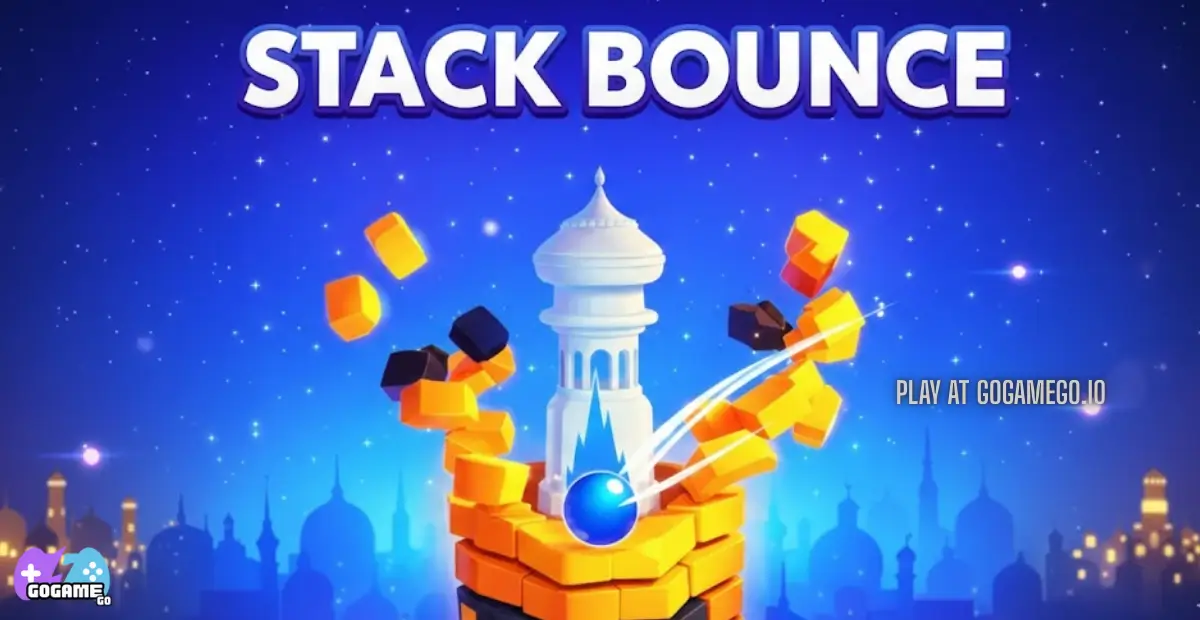
Stack Bounce drops you into a bright 3D tower made of colorful rings and your mission is simple: smash your bouncing ball all the way down without hitting the danger zones.
Kids love how the ball blasts through stacks at full speed, sending pieces flying while the tower spins and tries to trick you. It feels fast, loud, silly, and super satisfying when you crush the final ring.
Play Stack Bounce online for free on gogamego.io — no downloads, no installs, and fully unblocked at school or home. Just click and play instantly on laptop, tablet, or phone.
With endless levels, juicy sound effects, and that “one more try” arcade feeling, Stack Bounce has become one of the most popular hyper-casual ball games for kids who love speed, reaction timing, and tower-smashing chaos.
🎮 “Stack Bounce” – Game Snapshot
- Genre: Hyper-casual, Arcade, Ball Game
- Release Date: 2020
- Developer: HTML Games
- Platforms: Browser (PC, Mobile, Tablet), Chromebook
- Modes: Single Player, Endless Levels
What Is Stack Bounce?
Stack Bounce is a fast-paced tower-smashing browser game where a tiny bouncing ball crashes through colorful stacked rings while the tower spins beneath it. Your job is to break all the way down without touching the black danger zones that end your run instantly. The mix of timing, rhythm, and chaos makes it feel exciting even after dozens of tries.
The game was created by HTML Games, a small studio known for making playful HTML5 arcade titles that work smoothly on browsers without the need for downloads or tricky setups. The original launch dropped in 2020, and since then Stack Bounce has received small performance tweaks, improved touch controls for phones, and faster loading speeds, helping it stay popular on kids’ gaming websites.
What makes Stack Bounce special is how simple it feels at first, yet how hard it is to stop playing. Every level invites you to chase a better score, faster drops, and satisfying “combo smashes” where you burst through multiple rings in a single move.
The game has exploded in popularity because it runs great on school Chromebooks, mobile devices, and tablets, making it easy for kids to play during breaks. Its bright visuals, endless levels, and low stress design keep Stack Bounce trending on browser game platforms like gogamego.io.
Gameplay Overview
Stack Bounce is built for quick action and satisfying destruction. You control a bouncing ball sitting at the top of a tall 3D tower made of stacked rings. Each ring can break if you land on it, except for the dark “danger” segments that stop you instantly. The goal is to smash downward as far as possible without getting knocked out.
How to Play
The main objective is simple: time your taps so the ball breaks through the safe colored layers while avoiding the black tiles. With every clean hit, the tower cracks, pieces fly off, and your score goes up. If you chain multiple hits together without pause, you enter a “combo streak” that blasts through rings even faster.
Progression works through endless tower runs. There are no complex menus, paywalls, or upgrades — just pure arcade fun. The real reward comes from beating your own high score, improving reaction speed, and unlocking faster runs by mastering timing and rhythm.
Controls
- PC / Laptop: Click or hold mouse button to drop through stacks.
- Chromebook: Tap touchpad or screen for instant play.
- Mobile & Tablet: Tap and hold the screen to accelerate your ball. Lift to stop.
Stack Bounce is a single-player arcade game, designed to be fast and accessible with no confusing inputs or instructions.
Pro Tips
- Watch the tower spin: Don’t rush — wait for the danger tiles to rotate away.
- Use combo streaks: Holding down at the right moment shreds multiple layers at once.
- Lift to stay safe: If a dark segment comes up fast, release to stop instantly.
- Look ahead: Eyes on lower rings give more reaction time for tricky patterns.
- Speed on clean runs: When you see long stretches of safe colors, go full blast.
- Play on mobile for control: Touch screens make timing smoother for many players.
- Don’t chase score too early: Learn the rhythm first, then push for combo points.
- Stay calm on fast spins: The tower gets trickier as you get deeper — panic means mistakes.
- Retry instantly: The fastest learners restart quickly to build muscle memory.
Key Features
Stack Bounce keeps players glued to the screen with fast gameplay, colorful visuals, and simple tap controls that feel great on every device. These features make it one of the most replayed tower arcade games on browser platforms.
- Endless Tower Mode: Levels never run out, so players can always try to beat their best score. This encourages improvement and keeps the challenge fresh.
- Combo Break System: Holding the tap at the right moment triggers a powerful combo streak that shreds multiple rings at once. It feels rewarding and looks awesome as the pieces fly.
- Simple One-Tap Controls: No complicated inputs — just tap to drop and release to stop. Kids can start playing instantly without tutorials.
- Bright & Colorful Graphics: The vivid tower colors make each run feel exciting and easy to read, helping players predict where danger zones are hiding.
- Perfect for Short Sessions: Every run lasts seconds, not minutes, making it ideal for breaks, school downtime, or quick mobile play.
- Works on Any Device: The HTML5 design runs smoothly on PC, tablet, mobile, and Chromebook with zero downloads or installations.
- Satisfying Sound Effects: The crunchy smash effects and bounce sounds boost excitement and make each successful combo feel rewarding.
- High Score Chase: Players can track personal bests and replay repeatedly to climb higher, building motivation and replay value.
Game Modes
Stack Bounce focuses on fast solo gameplay built around precision, timing, and score chasing. While the main mode is single-player, different browser platforms have introduced creative twists such as racing scoreboards, leaderboard comparisons, and daily challenge runs. These variations let kids compete indirectly without needing a traditional multiplayer setup.
Solo Mode
The core mode is a single-player endless tower run. You guide your bouncing ball downward through stacked rings while avoiding dark danger tiles. Difficulty rises as towers spin faster, rings shrink, and danger segments appear more often. The reward comes from breaking your own score records, achieving long combo streaks, and unlocking faster rhythms through practice. The simplicity makes it ideal for quick breaks, but mastering it takes real skill.
Competitive & Leaderboard Play
Some versions of Stack Bounce include global or local leaderboards where players compare high scores. This acts as a soft multiplayer mode without matchmaking, encouraging friendly competition between classmates, siblings, or other players on gogamego.io.
Multiplayer & Co-op Variants
While the original release doesn’t include real-time multiplayer or co-op, kids often create their own “local competition” by taking turns and racing for the highest score. Short session length makes this surprisingly fun, and no setup is required.
Tournaments & Challenges
Seasonal events and tournament-style challenges are not official features, but they occasionally appear on browser gaming platforms through community contests or classroom scoreboard challenges. These unofficial modes boost engagement and give players fresh goals beyond the standard run.
Characters & Customization
Characters
Instead of classic heroes or mascots, Stack Bounce uses a playful cast of bouncing balls that act like characters. Each ball has its own look and personality style, which kids love to pick before a run. These versions don’t change the core rules, but they make the gameplay feel more personal and fun.
- Classic Ball: The original bright sphere with clean colors and a soft bounce. Great for first-time players.
- Neon Ball: Glows with electric colors and trails — popular with kids who love fast visuals.
- Galaxy Ball: A starry, space-style ball that feels like it’s dropping through outer space.
- Lava Ball: Hot orange and red patterns that make combo breaks look even more explosive.
- Rainbow Ball: Swaps colors while falling, adding flair during long streaks.
Customization
Some browser versions of Stack Bounce let players swap ball colors, choose visual trails, or pick tower themes that match their style. These light cosmetic tweaks don’t require grinding or purchases — kids just play and switch whenever they want. No confusing menus, no upgrades, and no pay-to-win systems.
The benefit of this simple customization approach is that kids can express personality without needing tutorials or currency. It keeps the focus on smashing stacks, chasing high scores, and celebrating perfect combo streaks on gogamego.io.
Special Moves & Combos
Stack Bounce may look simple at first, but the game actually rewards clever timing and fast reactions through different move styles and combo patterns. These moves help players survive longer, earn bigger scores, and pull off flashy tower smashes that feel amazing to watch.
- Quick Tap Smash: Light taps drop the ball one layer at a time. This move is perfect for tight danger zones where precision matters more than speed.
- Hold & Break Combo: Holding the tap sends the ball into a powerful streak that cuts through multiple safe rings. Best used on long stretches with zero dark tiles.
- Spin Check Wait: Pausing at the top gives the tower time to rotate, revealing safer paths. This move prevents panic mistakes and keeps runs alive longer.
- Danger Dodge Release: When a black tile appears suddenly, letting go instantly stops the drop. It’s the most important survival technique for late-game towers.
- Chain Burst Combo: Smashing through several layers without stopping creates a high-speed chain effect that boosts score and feels super satisfying.
- Safe Gap Drop: Players wait for a clean opening, then burst downward through multiple colored rings before danger returns.
- Perfect Run Bonus: Skilled players avoid every dark tile in long streaks, reaching deeper towers and climbing leaderboard rankings on gogamego.io.
Mastering these moves isn’t just about speed — the real secret is patience, rhythm, and knowing when to tap and when to stop. Kids who learn this balance quickly become unstoppable tower crushers.
Tips & Tricks
Stack Bounce becomes way more exciting once you learn how to control the tempo instead of playing on pure luck. Here are some helpful tricks that make smashing towers easier, safer, and much more satisfying.
- Play Slow First: Take short taps in early levels to learn how danger tiles rotate. Rushing too soon ends most runs.
- Watch the Tower, Not the Ball: Focusing on rotation patterns lets you react before danger tiles line up underneath you.
- Use Combo Windows: When you spot a long stretch of safe colors, hold to blast downward and rack up score streaks.
- Release to Survive: The fastest players stop instantly when danger tiles appear. It’s the difference between high scores and game over screens.
- Plan Ahead: Scan at least three layers down before committing to a drop. Advanced players treat Stack Bounce like a rhythm puzzle.
- Save Combos for Deep Levels: The lower sections spin faster, making combo streaks worth more and way cooler to watch.
- Play on Big Screens:** Tablets and larger phones provide more visual space, making danger tiles easier to read.
- Stay Calm on Speed Spins: Panic tapping breaks your timing — breathing helps a lot in late-game towers.
- Retry Fast: Short reset times help build muscle memory, which boosts timing and confidence.
- Challenge Friends: Even without multiplayer, racing siblings or classroom buddies for high scores on gogamego.io makes the game more exciting.
- Learn Danger Tile Rhythm: Most towers rotate on predictable loops. Once you feel the rhythm, openings become obvious.
- Don’t Chase Score Early: Surviving deeper brings bigger score bursts later. Patience pays off.
Platforms & Technology
Stack Bounce runs directly in your web browser, making it easy for kids to play at home or at school without downloads, accounts, or apps. The game works smoothly on Chrome, Safari, Firefox, Edge, and most mobile browsers, including tablet and Chromebook setups.
Players can choose between mobile touch controls or desktop mouse clicks. Mobile feels more tactile for quick combo bursts, while desktop offers slightly more precision for careful timing runs. Both play styles are fully supported on gogamego.io.
Under the hood, Stack Bounce is powered by lightweight HTML5 technology with WebGL-style visuals and efficient animations that run at stable frame rates even on older devices. For best performance, keeping a few extra browser tabs closed helps reduce lag and makes tower smashing feel even smoother.
Can I Play Stack Bounce Unblocked?
Yes! Stack Bounce can be played unblocked right in your browser, which makes it a favorite for students looking for quick gaming breaks at school, after class, or even during free study periods. Since the game runs online without installs or extra software, most school networks allow it to load instantly.
The unblocked version on gogamego.io also works perfectly at home or at work, letting players enjoy fast tower-smashing fun anywhere with an internet connection. There are no downloads, no sign-ups, and no heavy ads getting in the way of gameplay, so you can start bouncing and breaking stacks immediately.
Just open the page, tap to play, and try to beat your best score — Stack Bounce is always ready when you are.
Similar Games
Love the fast tower-smashing action in Stack Bounce? Here are more free, unblocked arcade and ball games on gogamego.io that offer the same quick reflex, high-score-chasing fun.
- Neon Leap – Jump through glowing platforms, dodge hazards, and follow neon trails in a fast-paced reflex jumper.
- Slope 3 – Roll a speeding ball down a neon track, avoid gaps, and survive as the slope gets faster.
- Slope Tunnel – Guide a glowing ball through a twisting tunnel full of sharp turns and sudden walls to dodge.
- Curve Ball 3D – Play futuristic 3D pong, curve your shots, and test your hand–eye coordination in short, intense rounds.
- 99 Balls 3D – Fire bouncing balls at numbered blocks, plan your angles, and clear the screen before it fills up.
- Pengu Slide – Slide a cute penguin down icy hills, time your jumps, and chase longer, faster runs.
- Flappy Bird – Tap to keep your bird in the air, fly between pipes, and push your high score higher and higher.
- Doodle Jump – Bounce up, grab power-ups, and avoid monsters in this classic endless vertical jumping game.
- Knife Hit – Throw knives at spinning logs, smash fruit, and use perfect timing to avoid hitting your own blades.
Game History & Updates
Stack Bounce launched in 2020 as a light, hyper-casual browser game built for quick one-tap arcade fun. The idea was simple: drop a bouncing ball through stacked rings while avoiding dark danger tiles. The clean design and fast feedback loop helped the game spread fast across gaming platforms, especially ones used by kids and schools.
Over time, the developers rolled out small but meaningful performance tweaks and quality-of-life updates. These included smoother touch controls on phones, faster loading on school Chromebooks, better frame stability for older laptops, and visual polish that made combos easier to read. None of these updates changed the core gameplay, but they made Stack Bounce more accessible for new players.
The community grew naturally through classrooms, lunch breaks, and browser game hubs. Kids loved challenging siblings and friends for high scores, even without a traditional multiplayer mode. This friendly competition boosted popularity and helped the game stay visible on unblocked gaming sites such as gogamego.io.
While there isn’t an official roadmap with future patches or expansions, Stack Bounce continues to benefit from evergreen replay value and browser compatibility. As long as kids love chasing high scores and smashing towers, the game will keep its place as a favorite quick-play arcade title.
FAQ
Is Stack Bounce free to play?
Yes! Stack Bounce is 100% free to play online on gogamego.io. There are no downloads, no subscriptions, and no paywalls blocking levels or features.
Can I play Stack Bounce unblocked at school?
Most school networks allow the game because it runs inside the browser without special software. Kids can enjoy it during breaks, study hall, or computer time.
How do you play Stack Bounce?
Just tap or click to drop your ball and smash through colored rings. Avoid the dark danger tiles or the run ends instantly. The goal is to get as far as possible and beat your high score.
Is Stack Bounce safe for kids?
Yes. The game is kid-friendly, has no harmful content, and doesn’t require chat, accounts, or data sharing.
Does Stack Bounce work on phones?
Absolutely. The game supports touch controls and runs smoothly on mobile, tablet, and Chromebook.
Are there upgrades or skins?
Some versions offer ball skins and color themes, but upgrades don’t change gameplay. They’re just fun visual styles.
How do you get a high score?
The best strategy is to wait for clean openings, trigger combo streaks, and avoid panic taps in fast spins.
Does Stack Bounce have multiplayer?
There’s no real-time multiplayer, but players often compete through local high scores and classroom leaderboards on gogamego.io.
Do I need to install anything?
No installs are needed. Just press play and the game starts instantly in your browser.
Conclusion
Stack Bounce delivers everything kids love about quick arcade games — simple controls, fast reactions, colorful graphics, and the thrill of chasing a new high score. It’s the kind of game that works instantly for beginners while still giving skilled players plenty to master through timing, patience, and combo streaks. With no confusing menus or complicated systems, the fun happens right away and keeps players coming back for “just one more try.”
Because Stack Bounce runs smoothly on browser platforms, it works at home, at school, or on the go. No downloads, no sign-ups, no ads blocking the screen — just pure tower-smashing gameplay that feels satisfying every time you drop through a long stretch of safe colors.
If you’re ready to test your reaction speed, break endless stacks, and see how deep you can go before the tower fights back, jump into the action today on gogamego.io. Hit play, smash those rings, and try to climb higher and higher on the scoreboards. The stacks are waiting — show them who’s boss!