
Breaking The Bank
Similar Games




Description
Introduction
Henry Stickmin is back with one of his funniest challenges ever! In Breaking The Bank, you join him as he tries to sneak, dig, blast, or teleport his way into a giant vault hidden in the desert. Every choice creates a new silly moment, making it a favorite for kids who love quick laughs and simple point-and-click fun.
On gogamego.io, the whole adventure is free, safe, and fully unblocked—just tap play and jump straight into the action. No downloads, no delays, just pure cartoon chaos on any device.
Kids love Breaking The Bank because every attempt ends in a goofy fail or a surprising twist. Each option feels like opening a mystery box full of jokes, animations, and unexpected disasters. It’s fast, funny, and perfect for players who enjoy exploring all the different endings.
Start playing Breaking The Bank now on gogamego.io and see if you can uncover every wild choice Henry makes on his quest to crack the vault.
🎮 “Breaking The Bank” – Game Snapshot
- Genre: Interactive Comedy, Point-and-Click Adventure
- Release Date: August 2008
- Developer: PuffballsUnited
- Platforms: Browser (HTML5), PC, Mobile
- Modes: Single-Player
What Is Breaking The Bank?
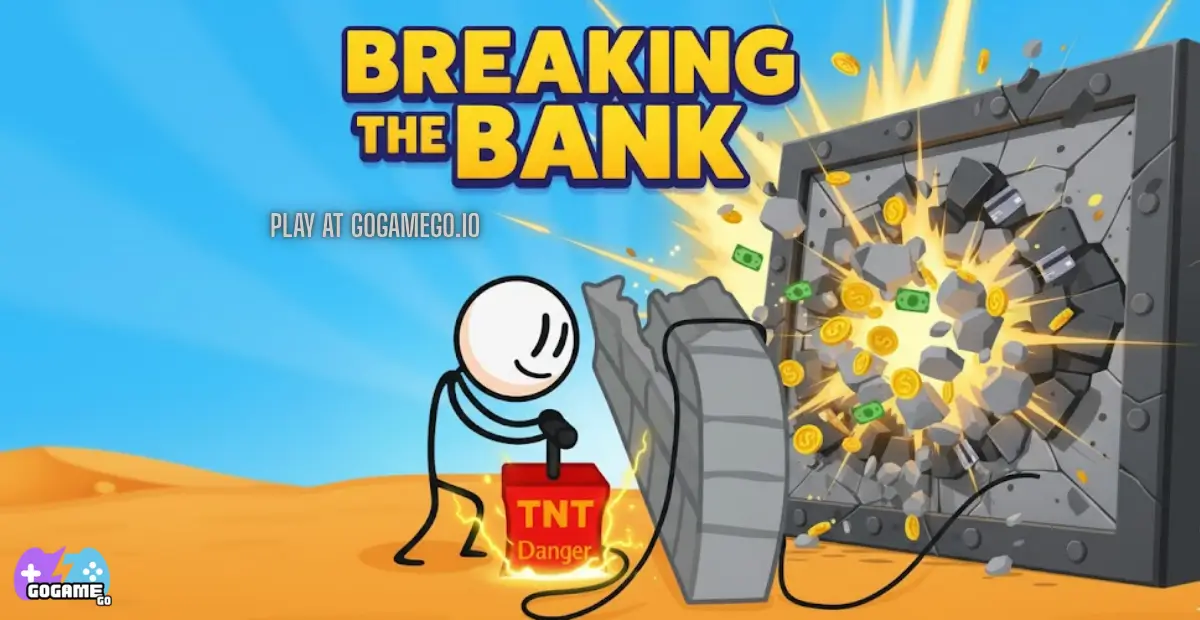
Breaking The Bank is a hilarious point-and-click adventure that kicks off the iconic Henry Stickmin series. The game follows Henry, a bold (but not always bright) stickman who wants to break into a giant desert bank using the silliest tools you can imagine. Kids love it because every choice triggers a different goofy fail, surprise animation, or mini-ending, turning the whole game into a playful experiment full of slapstick humor.
The game was created by PuffballsUnited, an independent developer known for turning simple stickman drawings into unforgettable comedy moments. Released in 2008, Breaking The Bank became the first chapter in a series that later received remasters and new animations in the Henry Stickmin Collection. Even today, the original browser version stays popular thanks to its quick gameplay, funny reactions, and endless replayability.
What makes Breaking The Bank truly unique is its choose-and-watch format. Kids don’t need fast reflexes—just curiosity. Each button you click reveals another unexpected disaster: tunnels collapsing, gadgets exploding, lasers misfiring, and disguises going horribly wrong. It’s simple, silly, and perfect for young players who enjoy laughing at Henry’s unlucky adventures.
The game is trending again because the Henry Stickmin series has become a huge online favorite, especially among kids watching gaming creators on YouTube and TikTok. Its short length, clean humor, and meme-worthy fails make it a perfect pick-up-and-play hit. On gogamego.io, Breaking The Bank stays one of the most loved free, unblocked games for quick fun anytime.
Gameplay Overview
Breaking The Bank delivers a playful, easy-to-learn experience where kids choose different ways for Henry Stickmin to try sneaking into a massive bank. Instead of fast action or complicated systems, the fun comes from experimenting with every silly tool Henry uses—each choice unlocking a new funny fail or secret reaction. The game doesn’t use levels or rewards like traditional adventures; instead, the “progression” comes from discovering all the possible outcomes. Players keep exploring until they’ve seen every goofy attempt, making it perfect for short, light-hearted sessions.
How to Play
Your main goal is simple: help Henry break into the bank… or at least try. Players pick from different items—like a shovel, laser drill, disguises, or explosives—and watch what happens. Every option triggers a unique animation, often ending in a surprising and funny disaster.
There are no levels to beat or missions to follow. Instead, you progress by testing each available tool and unlocking every possible ending. Some attempts fail instantly, others lead to longer scenes, and a few hide Easter eggs that kids love discovering.
Controls
1-Player Controls:
• Mouse: Click to choose an item or interact with menu buttons.
2-Player Mode:
Breaking The Bank is a single-player experience only, but two kids can still “share play” by taking turns choosing options.
Mobile Touch Controls:
• Tap: Select items and continue scenes.
• Tap & Hold: Not required, but works for menu navigation.
Pro Tips
- Try every option: The game’s fun comes from seeing all outcomes, not winning.
- Look for hidden Easter eggs: Some scenes include small surprises kids love spotting.
- Don’t skip fails: Every fail is handcrafted with silly animations worth watching.
- Replay choices in different orders: Some moments feel funnier when viewing them back-to-back.
- Use headphones if possible: Sound effects make the fails even funnier.
- Encourage turn-taking: Great for siblings—each player chooses the next item.
- Experiment freely: There’s no “wrong” choice, so kids can explore without pressure.
- Watch Henry’s expressions: His simple stickman face adds to the comedy.
- Revisit the funniest scenes: Kids love replaying their favorite fails.
Key Features
Breaking The Bank packs a surprising amount of charm into its simple stickman world, giving kids a fun and friendly place to explore silly outcomes without pressure or complex gameplay. Every feature is designed to make the experience light, exciting, and full of laughs.
- Multiple Choice-Based Actions: Kids pick from different tools like shovels, lasers, explosives, or disguises. Each item leads to a unique animated scene, helping young players feel involved without needing fast reflexes.
- Funny Animated Fails: Every attempt ends in a playful, cartoon-style fail that keeps the game entertaining. The humor encourages replayability and makes kids eager to see what happens next.
- Simple Point-and-Click Gameplay: The controls are easy for any age, letting children play confidently. No complicated mechanics mean they can focus fully on exploring and having fun.
- Short, Replayable Format: Each run lasts only seconds or minutes, perfect for quick gaming breaks. Kids can discover all endings without feeling overwhelmed.
- Kid-Friendly Comedy: The game focuses on silly outcomes rather than violence, making it a safe choice for younger players who enjoy harmless slapstick humor.
- Hidden Easter Eggs: Some scenes feature secret details that reward observant players, adding an extra layer of surprise and discovery.
- No Time Limits or Pressure: Players can explore at their own pace, making it an ideal experience for children who prefer stress-free games.
All these features combine to make Breaking The Bank one of the most enjoyable, accessible, and endlessly entertaining stickman games available on gogamego.io.
Game Modes
Breaking The Bank keeps things simple and kid-friendly with a focus on one main gameplay style, but that’s exactly what makes it charming. Its modes are built around easy exploration, silly reactions, and stress-free fun—perfect for young players who just want to experiment and laugh. Here’s how each mode works, including helpful ways kids can still enjoy it together.
Solo Mode
Solo Mode is the core experience of Breaking The Bank. Players guide Henry Stickmin by choosing one of several items to help him break into the desert bank. There’s no real difficulty curve, no fail penalties, and no rewards other than the joy of discovering a new ending. Kids simply click, watch, and enjoy funny outcomes. Because there’s no pressure, Solo Mode is great for younger players who want a safe, casual game they can explore at their own pace.
Multiplayer Mode
Breaking The Bank doesn’t include online multiplayer or matchmaking since the game is designed as a simple point-and-click adventure. However, many kids enjoy “shared play,” where friends take turns choosing tools and guessing what will happen next. This creates a fun social experience even without a built-in online system.
Local Co-op
Although there’s no official co-op mode, the game is easy to turn into a group activity. Two or more kids can sit together and alternate choices, vote on which option Henry should try next, or rewatch their favorite fails. This makes the game great for siblings or classroom breaks.
Tournament or Seasonal Modes
Breaking The Bank doesn’t feature tournaments or seasonal events. Its charm lies in its simplicity—quick laughs, instant action, and endless replay without any competitive pressure.
Characters & Customization
Breaking The Bank focuses on simple, funny storytelling with a cast of stickman characters who bring the humor to life. While the game isn’t built around deep customization or large character lists, the personalities that do appear help shape Henry’s hilarious journey. Kids enjoy how each character reacts differently to Henry’s crazy choices, creating moments that feel lively and unpredictable.
Characters
- Henry Stickmin: The star of the game—curious, determined, and always ready to try the silliest ideas. Henry’s straight-faced reactions make every fail even funnier.
- Bank Guard: A tough, no-nonsense character who keeps watch outside the vault. His surprised expressions add to the comedy when Henry’s plans go wrong.
- Security Team: These guards rush into action whenever something explodes or breaks. Their over-the-top reactions help deliver some of the game’s funniest scenes.
- Desert Worker: A background character who appears during certain attempts, adding extra life to the setting without stealing the spotlight.
- Vault Staff: Seen inside the bank during specific fails, they help show how silly and chaotic Henry’s attempts can get.
Customization
Breaking The Bank doesn’t offer traditional customization like outfits, colors, or upgrades, but its charm comes from the many tools Henry can choose from. Each item functions like a “temporary character style,” giving Henry a new action and personality twist.
- Tools as Styles: Items such as the shovel, laser drill, explosives, teleporter, or disguise act as mini-customization choices, changing how Henry behaves in each attempt.
- Scene Variations: Each choice unlocks unique animations, letting players “customize” their experience by discovering different outcomes.
- Replay Customization: Kids can shape their playthrough by deciding the order of attempts, creating their own style of comedy.
Even without classic customization, Breaking The Bank lets kids shape the adventure through choices, giving the game a playful sense of personal creativity.
Special Moves & Combos
Breaking The Bank doesn’t use traditional combat moves or combo systems like action games do, but each tool Henry chooses works like its own special move. Every item triggers a unique animation, outcome, or surprising twist, giving players a collection of mini “abilities” to experiment with. Kids love testing each option to see what silly disaster or unexpected moment unfolds next.
- Shovel Dig: Henry digs underground to sneak into the vault. It’s a classic “stealth move,” but things don’t go as planned. Strategy: Try this first to introduce kids to the game’s humor and timing.
- Explosive TNT: Henry sets an explosive near the bank wall. A powerful choice that delivers a wild reaction. Strategy: Use when kids want a big, surprising scene full of sound and action.
- Laser Drill: A high-tech tool used to cut through the wall. The idea seems smart—until it reacts unexpectedly. Strategy: Great for teaching kids cause-and-effect in a funny way.
- Wrecking Ball Swing: Henry brings in construction power to smash the vault open. It’s bold, loud, and entertaining. Strategy: Try after calmer options to create contrast and laughs.
- Disguise Strategy: Henry hides in an object to roll into the bank. It’s one of the most iconic attempts with a twist ending. Strategy: Fun to save for the end since it feels like a “smart move,” but surprises kids.
- Teleporter Jump: A sci-fi gadget that tries to zap Henry inside the vault. It’s random, unpredictable, and one of the funniest fails. Strategy: Use when kids want something magical or unexpected.
- Drill Tunnel Combo: Combining digging-style approaches (Shovel → Laser Drill → TNT) in separate runs creates a fun pattern that helps kids explore all outcomes in order.
Each move isn’t about winning—it’s about discovery. By trying every tool, kids learn patterns, laugh at surprises, and enjoy the creative freedom Breaking The Bank is known for.
Tips & Tricks
Breaking The Bank may look simple, but there’s a lot of fun hidden behind its different choices and silly outcomes. With the right tips, kids can explore the game in smarter, more playful ways while discovering every secret the adventure has to offer. These tricks help players make the most of each attempt, learn faster, and enjoy every scene without missing anything important.
- Try Every Option First: The game’s biggest goal is exploring all the choices. Kids should click each tool at least once to unlock every fail and ending.
- Observe the Background: Sometimes tiny clues or funny Easter eggs appear behind Henry. Watching closely helps kids catch extra jokes.
- Replay Fails You Love: If a scene feels extra funny, replaying it helps kids enjoy the timing, humor, and animation again.
- Compare Similar Tools: Using tools with similar themes—like TNT and a laser drill—shows how different reactions can be, teaching fun cause-and-effect.
- Experiment With Order: Playing attempts in different sequences makes the experience feel fresh and keeps kids engaged.
- Use Headphones: The sound effects add huge charm to each fail, and kids often enjoy the audio humor even more.
- Let Kids Guess the Outcome: Encourage guessing before clicking. It turns the game into a fun mini-challenge.
- Take Turns for Group Play: Even though it’s single-player, kids can rotate choices for a shared experience.
- Try the Calm Options Before the Wild Ones: More explosive tools feel funnier when saved for last.
- Use the Teleporter Early or Late: Its randomness makes it perfect for surprising moments.
- Rewatch Scenes Slowly: Some gags happen quickly—watching again helps spot hidden details.
- Encourage Creative Thinking: Ask “What would YOU pick to break into a bank?” to inspire imagination beyond the game.
With these tricks, Breaking The Bank becomes even more entertaining, giving kids a fun mix of strategy, humor, and creativity as they explore every silly moment.
Platforms & Technology
Breaking The Bank runs smoothly on all modern browsers, making it easy for kids to play on Chrome, Firefox, Safari, and Edge without downloading anything. The game is powered by HTML5 technology, replacing old Flash versions and giving players faster loading times, cleaner animations, and safer performance.
On desktop, kids enjoy a bigger screen and easier clicking, while the mobile version offers simple tap controls that work perfectly on phones and tablets. Both platforms deliver the same funny scenes, so players can switch between devices anytime.
Because the game is lightweight, it performs well even on older laptops and budget mobile phones. For the best experience, keep only a few tabs open, make sure your browser is updated, and enable hardware acceleration if available. This helps animations stay smooth and prevents lag during Henry’s funniest moments.
Can I Play Breaking The Bank Unblocked?
Yes! You can play Breaking The Bank completely unblocked on gogamego.io. The game loads right in your browser with no restrictions, making it perfect for kids who want quick, safe fun anytime. Because it’s fully browser-based, you can enjoy Breaking The Bank at school, work, home, or anywhere with an internet connection—no blocks, no downloads, and no extra steps.
Many players search for “Breaking The Bank unblocked” because they want a fast, clean version that works on all networks. On gogamego.io, the game runs instantly without ads, pop-ups, or risky files, giving kids a smooth, distraction-free experience. Whether you’re on a school Chromebook, a home laptop, or a mobile device, you can jump into Henry Stickmin’s funniest adventure with a single click.
Just open the game page, press play, and enjoy unlimited access to every silly fail and ending—totally unblocked.
Similar Games
Love the silly choices and funny fails in Breaking The Bank? Here are more free, unblocked games on gogamego.io that kids can jump into next for fast laughs, stickman action, and simple point-and-click fun.
- We Become What We Behold – A short, click-to-choose story where your decisions change what happens on screen, perfect for fans of simple, smart comedy.
- There Is No Game – A funny “not really a game” puzzle adventure full of jokes, surprises, and clever twists that kids love exploring.
- Murder – A quick stealth game where timing and guessing matter more than speed, with cartoon humor instead of scary moments.
- Stickman Hook – Swing, flip, and fly through levels as a stickman, great for kids who enjoy simple controls and satisfying physics.
- Vex X3M – A fast parkour stickman game with tricky traps and checkpoints, ideal for players who like skill challenges after story games.
- Vex 7 – More advanced stickman parkour with stealth stages and missions, perfect for older kids who want extra challenge.
- Ovo Online – Smooth, minimalist parkour where every jump and dash matters, fun on both desktop and mobile.
- Short Life – A ragdoll platformer packed with goofy traps and over-the-top fails, great for players who enjoyed Henry’s slapstick moments.
- Short Life 2 – Bigger levels, funnier animations, and even more creative ways to fail in a safe, cartoon style.
- Prison Life : Idle Game – A lighthearted idle game where kids manage a cartoon prison, a fun nod to Henry’s later “escaping the prison” adventures.
Game History & Updates
Breaking The Bank began its journey in 2008 as the very first chapter in the Henry Stickmin series, created by the indie developer PuffballsUnited. The game started as a small, fun experiment built in Flash, designed around a simple idea: let players choose different ways for Henry to break into a bank and enjoy the silly results. Its lighthearted humor, cartoon fails, and easy click-to-play format quickly helped it spread across browser-gaming sites, becoming a favorite among kids and early online creators.
Over the years, the game received quality improvements, animation touch-ups, and minor bug fixes to keep it running smoothly. Its biggest update came when the original Flash version was rebuilt in modern formats to work on HTML5, making it playable on sites like gogamego.io without plugins or downloads. It also returned in fully remastered form as part of the Henry Stickmin Collection, where animations were redrawn in HD and transitions became smoother.
The community around Breaking The Bank has grown steadily thanks to YouTubers, school gamers, and TikTok creators who enjoy showcasing Henry’s funny fails. Kids especially love sharing reactions, ranking their favorite choices, and exploring the rest of the Henry Stickmin games after completing this first chapter.
While the game itself doesn’t receive frequent new patches, its legacy continues through the entire Stickmin series and the active fanbase that keeps it trending. If PuffballsUnited ever releases future updates or additions, they usually appear through community posts or collection-wide improvements rather than direct changes to this standalone chapter.
FAQ
What is Breaking The Bank about?
Breaking The Bank is a funny point-and-click adventure where you help Henry Stickmin try different ways to break into a desert bank. Each choice leads to a silly animation or unexpected fail.
Is Breaking The Bank free to play?
Yes! You can play it completely free on gogamego.io with no downloads, no ads, and no sign-ups required.
Can I play Breaking The Bank unblocked at school?
Absolutely. The HTML5 version on gogamego.io is fully unblocked, making it easy to play on school Chromebooks or restricted networks.
Does Breaking The Bank work on mobile?
Yes, the game runs smoothly on phones and tablets. Simple tap controls make it easy for kids to enjoy anywhere.
How many endings does Breaking The Bank have?
The game has multiple unique outcomes, each tied to the item you choose. Every tool creates a different fail or twist.
Are there any levels or missions?
No levels or missions—just pick an item, watch what happens, and explore every possible outcome at your own pace.
Is the game safe for kids?
Yes. The humor is cartoonish, light, and non-violent. It focuses on silly reactions rather than anything scary or realistic.
Can two players play the game?
It’s single-player, but kids often take turns choosing tools, turning it into a fun shared activity.
Who made Breaking The Bank?
The game was created by PuffballsUnited, the developer behind the whole Henry Stickmin series.
What should I play after Breaking The Bank?
You can try other Henry Stickmin chapters or browse similar stickman games on gogamego.io for more funny adventures.
Conclusion
Breaking The Bank is one of those rare games that manages to stay funny, simple, and endlessly replayable no matter how many times you try each option. With its kid-friendly humor, quick point-and-click choices, and surprise-filled outcomes, it’s the perfect game for players who love experimenting and laughing at every silly fail Henry Stickmin walks into. The short scenes, smooth HTML5 performance, and instant, unblocked access on gogamego.io make it easy for kids to enjoy anytime—at home, in class breaks, or on mobile.
The charm of Breaking The Bank comes from the freedom to explore every tool, discover every ending, and enjoy the adventure without pressure or difficulty. It teaches curiosity, creativity, and problem-solving in a playful, harmless way that keeps young players coming back for more.
If you’re ready to jump into one of the funniest stickman adventures ever made, hit play on Breaking The Bank now on gogamego.io. Try every option, unlock every fail, and start your Henry Stickmin journey with nonstop laughs and surprises.