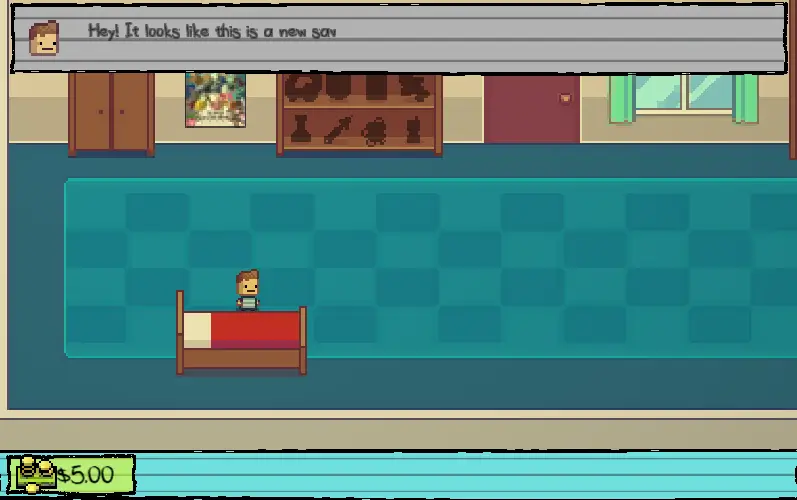
Step into a school day that’s anything but normal! Kindergarten 2 brings you a playful mix of mystery, humor, and classroom chaos, all wrapped in bright cartoon fun perfect for young players and curious teens.
On gogamego.io you can jump straight into the adventure — totally free, fully unblocked, and ready to play in your browser with no downloads or sign-ups slowing you down.
Meet new classmates, uncover silly secrets, and discover surprising paths as you explore a brand-new school filled with puzzles and choices that shape your story.
Grab your virtual backpack and tap PLAY to start your funniest, strangest, and most unforgettable school day yet!
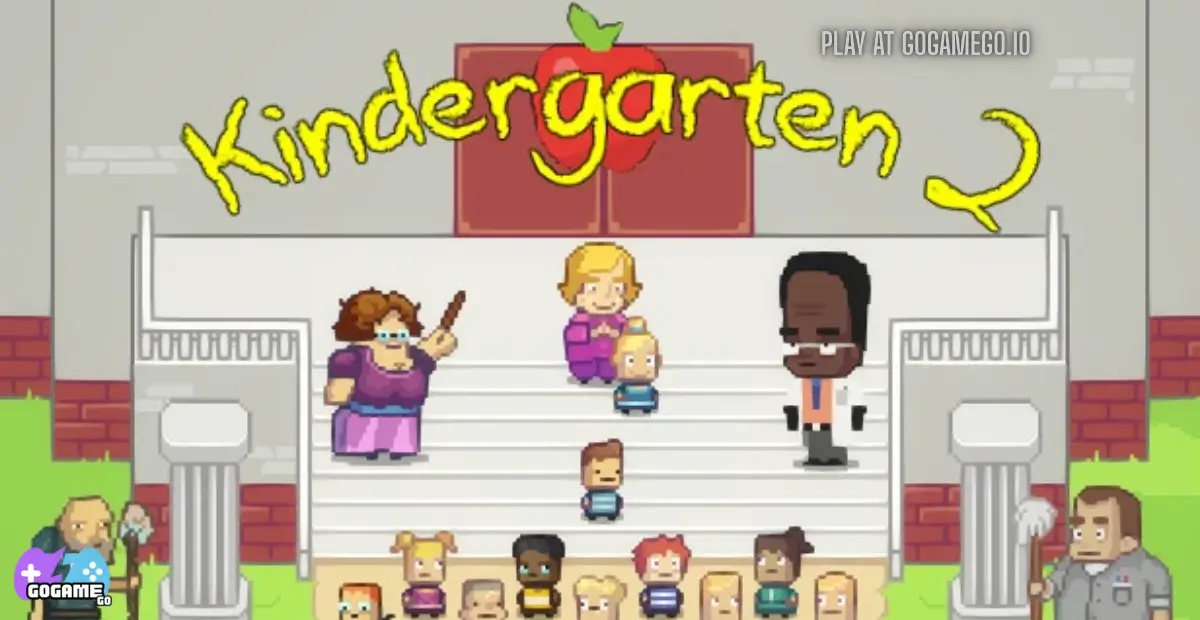
Kindergarten 2 is a quirky, story-driven adventure game where every school day turns into a wild puzzle filled with secrets, goofy characters, and surprising twists. Created by Con Man Games in partnership with SmashGames, the series is known for its clever writing, cartoon-style mystery, and interactive storytelling that keeps players curious and excited to explore more.
The game was officially released in 2019, arriving as the much-anticipated sequel to the cult-hit original. Since then, it has continued receiving performance updates and community fixes that make the gameplay smoother and more accessible across devices. Its loyal fanbase keeps the game alive with guides, theories, and constant replay challenges.
What makes Kindergarten 2 stand out is its unique mix of cute visuals and smart puzzles. Instead of a traditional level-based structure, you relive the same school day but unlock new missions, areas, and endings depending on the choices you make. Each character has a funny personality, and discovering their secrets feels like solving a friendly mystery adventure.
The game is trending again because more players are searching for fun, story-rich browser games that feel fresh and replayable. With its comedic chaos, multiple routes, and “just one more try” energy, Kindergarten 2 has become a favorite on gaming platforms like gogamego.io, where kids and teens can enjoy it free and unblocked anytime.
Kindergarten 2 mixes adventure, puzzles, and storytelling into one big, silly school day where every choice changes the path you take. Instead of traditional levels, the game uses a “replay the day” system. Each run lets you discover new clues, unlock missions, and solve problems by talking to classmates, trading items, and exploring different areas of the school. The more you experiment, the more story routes and surprises you uncover.
You’ll meet colorful characters, each with their own quests and secrets. Completing a mission often rewards you with special items or unlocks new areas for your next run. This progression encourages curiosity and creativity—kids can try different strategies, learn through trial and error, and enjoy the fun of solving mysteries in a playful school world.
Your main goal is to complete character missions by choosing the right actions, collecting items, and interacting with the environment. Every decision matters. Some quests require specific items, while others open new endings or shortcuts. Players move freely through classrooms, hallways, the yard, and more, discovering what each student or teacher is up to. Finishing missions unlocks new storylines for your next “day,” building a sense of discovery with each playthrough.
The game rewards smart choices, observation, and exploring every corner. There’s no timer, so kids can play at their own pace while learning cause-and-effect decision-making.
PC / Laptop (1-Player):
2-Player Mode: The game is single-player only, but players can take turns making choices or solving puzzles together for a shared experience.
Mobile / Touch Controls:
Kindergarten 2 is packed with playful, clever mechanics that make every school day feel fresh and exciting. Each feature is designed to spark curiosity, reward exploration, and keep players coming back for more discoveries.
Kindergarten 2 is primarily a single-player, story-driven adventure, but it offers several fun ways for kids and teens to enjoy the experience—whether they’re playing alone, sharing decisions with a friend, or challenging themselves to complete every mission.
The main way to play Kindergarten 2 is through its solo story mode. Here, players explore the school, interact with characters, and complete missions at their own pace. The difficulty adapts naturally depending on the choices you make—some routes are simple and silly, while others require more observation and planning. Rewards come in the form of new storylines, special items, and unlockable missions that deepen the mystery of the school.
While the game doesn’t feature traditional online multiplayer or matchmaking, many players enjoy a shared-play style where two or more friends work together, discuss choices, and solve puzzles as a team. This collaborative approach turns decision-making into a fun group experience, encouraging communication and teamwork.
Local co-op works as a “pass-and-play” style mode. One player moves the character while another decides dialogue options or helps remember clues. It’s simple to set up—just sit together, take turns, and brainstorm solutions. This style of co-op is perfect for siblings, friends, or parent-child play sessions, making the game more interactive and engaging.
Kindergarten 2 doesn’t include official tournaments or seasonal modes, but players often create fun personal challenges—speed-running missions, discovering every secret in one session, or trying to complete all routes without hints. These self-made competitions add replayability and keep the community active and creative.
Kindergarten 2 brings its schoolyard world to life with quirky, memorable characters who each add charm, humor, and mystery to your adventure. Every student has a unique personality, secret motivations, and silly habits that make the school feel unpredictable and fun. While the game doesn’t feature deep cosmetic customization like outfit changes, players “customize” their experience through choices, items, and the routes they unlock.
Kindergarten 2 focuses on “choice-based customization” rather than visual design. Players customize their journey by collecting items, choosing different mission paths, and discovering new ways to complete the day. Instead of outfits or skins, you unlock:
This system keeps the game simple for kids while giving them creative freedom to experiment and build their own unique adventure every time they play.
Kindergarten 2 isn’t a fighting or action-combo game, but it does include a set of “special moves” — clever actions, interactions, and item-based tricks that help you complete missions in smart and strategic ways. These moves work like puzzle-solving techniques, allowing players to progress through story routes, unlock secrets, and outsmart tricky situations. Mastering them makes each school day smoother, funnier, and more rewarding.
Mastering these clever “moves” makes each run more strategic, helping players unlock deeper mysteries and enjoy smoother, smarter progression.
Kindergarten 2 rewards clever thinking, timing, and curiosity. Even though it’s a kid-friendly adventure, many missions need strategy and planning. These tips help players unlock deeper routes, solve tricky puzzles, and master every part of the school day.
Kindergarten 2 runs smoothly on modern browsers thanks to its optimized HTML5 and WebGL technology. This makes the game easy to play on most devices without downloads or plugins. On gogamego.io, the game loads quickly and stays responsive whether you’re using Chrome, Firefox, Edge, or Safari.
The desktop experience offers the most precise control, especially during missions that require quick movement or multiple interactions. Mobile gameplay works great too—touch controls are simple and intuitive, making it easy for kids to tap, explore, and progress through story routes. Tablets generally provide the best balance of visibility and comfort.
For the smoothest performance, close unused browser tabs, enable hardware acceleration, and keep your device updated. Since the game is lightweight, even Chromebooks and budget phones can run Kindergarten 2 without lag, delivering a fun and reliable experience anywhere you play.
Yes! You can play Kindergarten 2 unblocked safely and instantly on gogamego.io. The game runs directly in your browser with **no downloads**, **no installs**, and **no annoying ads**, making it perfect for quick, worry-free gameplay wherever you are.
Because it’s powered by fast, secure browser technology, you can enjoy Kindergarten 2 unblocked at school, work, or home without hitting those frustrating network restrictions. Everything loads smoothly, the controls stay responsive, and you can explore all missions and story routes without interruptions.
Whether you’re sneaking in a short break at the office or playing during free time at school, Kindergarten 2 free and unblocked on GoGameGo gives you the full experience with zero barriers—just press play and start your funniest school adventure in seconds.
Love the funny school chaos in Kindergarten 2? Here are more story-driven and kid-friendly games on gogamego.io that fans of adventures, puzzles, and choices will enjoy.
The game Kindergarten 2 was officially released on **July 30, 2019**, developed by Con Man Games and published by SmashGames. :contentReference[oaicite:3]{index=3}
Since its launch, the game has received a number of important updates. A major patch on December 6 2022 enabled cloud saves, improved mission-map arrows, increased character move speed, stabilized Monstermon card battles, and fixed numerous bugs like invisible triggers and camera issues for ultra-wide screens. :contentReference[oaicite:4]{index=4} Other incremental patches have addressed user interface polish and gameplay smoothing. :contentReference[oaicite:5]{index=5}
The community around Kindergarten 2 has grown steadily. On platforms like Steam the game maintains a high user-rating, and fans create guides, walkthroughs, and discussions about endings, secrets and Monstermon cards. :contentReference[oaicite:6]{index=6} This active user base helps keep gameplay fresh and gives new players extra tips and motivation to revisit the game.
Although there is no fully public “roadmap” announced for future major expansions, the developers have referenced preparation for additional platforms and ongoing updates aimed at quality of life improvements. :contentReference[oaicite:7]{index=7} For players on sites like gogamego.io, this means more polished experiences, better stability, and continuing support—so the fun and surprises of Kindergarten 2 remain strong.
Yes! On gogamego.io, you can play Kindergarten 2 completely free in your browser. No downloads, no payments, and no sign-ups are required.
Absolutely. The game is fully unblocked on gogamego.io, making it safe to play at school, work, or home without network restrictions.
Yes, the game supports mobile play. Touch controls make it easy for kids to move, interact, and follow missions on phones or tablets.
They do! Kindergarten 2 uses a branching story system where your decisions unlock different missions, endings, and hidden routes.
The game is designed with cartoon humor and puzzle-style storytelling. It’s best suited for older kids and teens who enjoy mysteries and silly adventures.
A single run is short, but completing all missions and endings can take several hours. The replay system encourages experimenting with new paths.
No. Kindergarten 2 on gogamego.io runs instantly in your browser with zero ads and zero installs.
Saves depend on the device and browser, but progress is typically stored automatically. For best results, keep the same browser and avoid clearing data.
Kindergarten 2 is single-player, but many players enjoy a shared “decision-making” style where friends discuss clues and plan missions together.
Its mix of humor, mystery, and choice-based exploration makes it stand out. Players love discovering new secrets every time they replay the day.
Kindergarten 2 delivers a playful mix of mystery, humor, and puzzle-solving that keeps kids and teens excited to discover what happens next. Its branching story paths, colorful characters, and clever mission system make every school day feel fresh and surprising. Whether you’re uncovering secrets, trading items, or trying new routes, the game rewards curiosity and smart choices in a fun, kid-friendly way.
Because it’s fully unblocked and free on gogamego.io, players can jump in instantly—no downloads, no ads, and no limits. The smooth browser performance makes it perfect for school, home, or any quick play session. With its endless replayability and silly schoolyard chaos, Kindergarten 2 continues to be one of the most engaging story-driven games for younger audiences.
If you’re ready to explore secret tunnels, outsmart hilarious characters, and see how your choices shape the school day, it’s time to dive in. Tap the PLAY button and start your next adventure in Kindergarten 2 right now on GoGameGo!