
Labubu Clicker
Similar Games






Description
Introduction
Say hello to Labubu Clicker, a cheerful tap-and-grow adventure made for kids who love cute surprises! On gogamego.io, you can jump in instantly and play this free, unblocked Labubu game right in your browser—no downloads or accounts needed.
Every tap helps your tiny Labubu collect coins, open blind boxes, and discover silly new looks. With its bright colors, easy controls, and playful upgrade system, Labubu Clicker keeps kids smiling while they build their own Labubu collection.
If you enjoy relaxing idle clicker games, adorable characters, and simple rewards, this is the perfect place to start. Hit Play and watch your Labubu grow stronger, funnier, and even more magical with every click!
🎮 “Labubu Clicker” – Game Snapshot
- Genre: Idle Clicker, Casual, Kids Game
- Release Date: Not officially published
- Developer: Not officially listed (Visit Developer Website)
- Platforms: Browser (Play Free on gogamego.io)
- Modes: Single-Player
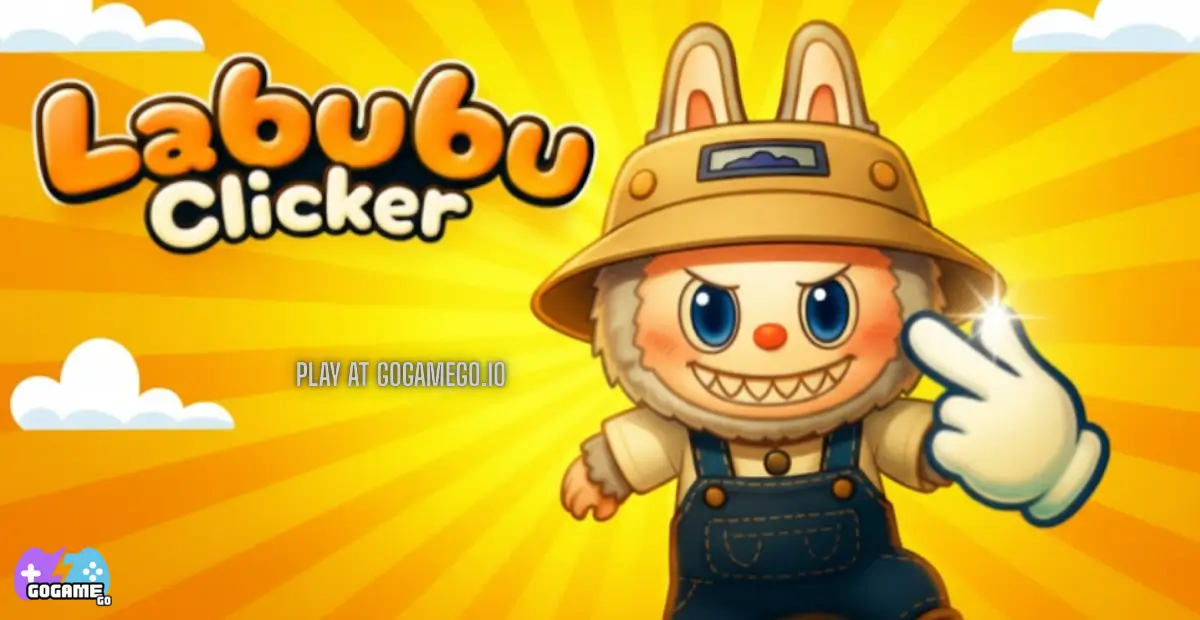
What Is Labubu Clicker?
Labubu Clicker is a cheerful, kid-friendly tap adventure where every click helps a tiny Labubu grow, upgrade, and unlock silly new surprises. Designed as an easy idle clicker, it mixes simple gameplay with bright colors, cute animations, and a reward loop that keeps young players excited. The game is played directly in the browser, making it fast, safe, and accessible for kids on almost any device.
Because the developer hasn’t officially shared their studio details, the game feels like one of those fun indie creations made purely to spark joy. Many small creators love releasing lighthearted titles like this, and Labubu Clicker has quickly become a favorite across free gaming sites thanks to its charm and simplicity.
While there’s no confirmed release year, the game continues to get small improvements across platforms—better animations, faster coin pop-ups, smoother clicking, and more Labubu skins—helping it stay polished and enjoyable for young players who love collecting and upgrading characters.
What makes Labubu Clicker special is its mix of cute surprise boxes, rapid tapping, and funny Labubu designs. Kids love seeing their Labubu change looks as they earn coins, and the instant rewards keep them engaged without complicated rules. The game has recently trended because of its connection to the popular Labubu character style, its unblocked playability at school, and the growing popularity of simple idle games on platforms like gogamego.io.
Gameplay Overview
Labubu Clicker is built around joyful, fast-paced tapping where every click makes your little Labubu stronger. Kids instantly understand the goal: tap to earn coins, spend those coins on upgrades, and unlock new Labubu styles through surprise blind boxes. The game keeps things simple while still giving players a satisfying sense of progress, making it perfect for growing attention spans.
How to Play
Your main objective is to help Labubu grow by clicking as fast as you can. Each tap earns coins, and those coins are used to unlock upgrades that boost your earning speed. The more upgrades you buy, the faster your coins multiply—turning simple clicking into a fun, colorful storm of rewards.
Players progress by collecting new Labubu skins, unlocking power-ups, and filling their blind box collection. Every upgrade increases your power, making it easier to reach higher levels and unlock even rarer Labubu styles. The loop is simple: click → earn → upgrade → collect → repeat, giving young players a sense of achievement without overwhelming them.
Controls
1-Player Controls:
• Mouse: Tap the Labubu or main button to earn coins.
• Keyboard (if supported): Some versions let you press Space for rapid tapping.
2-Player Modes:
Most versions of Labubu Clicker are single-player, but if a 2-player mode exists on certain releases, each player taps on their own side of the screen using either a mouse or keyboard.
(This depends on the specific publisher hosting the game.)
Mobile Touch Controls:
• Tap anywhere on the main click area to earn coins.
• Swipe or tap menus for upgrades and blind boxes.
Perfect for tablets and phones, especially for younger kids.
Pro Tips
- Tap in bursts: Short, fast tapping bursts usually earn more than slow, steady clicks.
- Upgrade early: Buy your first upgrades quickly—your earnings multiply much faster.
- Focus on auto-click upgrades: These keep earning coins even when you rest your hands.
- Open blind boxes often: New Labubu skins sometimes boost your coin rate.
- Balance speed and power: Don’t invest in only one—mix both for better results.
- Use both hands on desktop: Two-finger tapping works great for faster coin generation.
- Save coins for rare upgrades: Some upgrades cost more but give huge boosts.
- Check for boosts: Some versions offer temporary bonuses—use them right away.
- Play on mobile for faster tapping: Kids often tap quicker on touch screens.
- Restart upgrades if needed: If progress slows, resetting your strategy often helps.
Key Features
Labubu Clicker shines because it’s simple, rewarding, and packed with surprises that keep kids excited every time they play. Each feature adds comfort, motivation, or pure fun, making the game perfect for young players who love tapping, collecting, and upgrading.
- Easy Tap-to-Play Gameplay: Kids can start playing instantly by tapping to earn coins. This simple control style helps younger players stay engaged without needing instructions.
- Colorful Blind Boxes: Opening surprise boxes reveals new Labubu skins and items. The excitement of “What’s inside?” keeps kids motivated to collect more.
- Upgrade System: Players can boost their click power and coin production. These upgrades give a satisfying feeling of growth and progress.
- Auto-Click Boosts: Some versions let Labubu earn coins even when players stop tapping. This helps kids who enjoy progress without constant manual clicking.
- Kid-Friendly Graphics: Cute, gentle animations and bright colors create a safe and fun atmosphere. Perfect for children who enjoy playful characters.
- Unblocked Browser Play: Play instantly on gogamego.io without downloads or signup. Great for schools, Chromebooks, and quick entertainment.
- Collectible Labubu Skins: Kids can build their own Labubu collection with rare and silly designs. The collecting aspect adds long-term replay value.
- Progress at Your Own Pace: No timers or pressure—kids can play casually and grow their Labubu whenever they want. This makes the game relaxing and safe for all ages.
Game Modes
Labubu Clicker is mainly known as a fun, single-player idle clicker designed for kids, but different platforms sometimes offer small gameplay variations. To keep things accurate and safe, this breakdown focuses on the modes commonly found across browser clicker games, while clearly noting which ones may or may not be available in all versions.
Solo Mode is the core experience. Players tap to earn coins, level up their Labubu, and unlock new skins through blind boxes. The difficulty stays gentle, making it perfect for younger children—no enemies, no complicated mechanics, and no stress. Rewards grow as players upgrade click power or unlock auto-tappers, giving a steady sense of progress. Most kids enjoy solo mode because they can play quietly at their own pace and build their Labubu collection without pressure.
Multiplayer Mode is not officially included in most known versions of Labubu Clicker. However, some mirrored or fan-made clicker versions online feature simple “tapping races” where two players compare progress. These are not standard but can appear on some gaming platforms with unofficial additions.
Local Co-op is uncommon, but on touchscreen devices, two kids can take turns tapping or help each other upgrade Labubu together. While not a formal mode, parents often enjoy this calm, teamwork-friendly style because it encourages shared play without competition.
Tournament or Seasonal Modes are not part of the official game, but certain gaming websites may host leaderboards or time-limited challenges based on total clicks or speed. These events keep kids motivated by giving them fun goals to chase without adding difficulty or stress.
Characters & Customization
Labubu Clicker brings a charming world of adorable Labubu variations, each with its own playful personality. Kids love discovering every new look because each character feels like a tiny friend with unique traits, colors, and animations. The game keeps things simple and joyful while giving young players just enough customization to feel creative.
Characters
- Classic Labubu: The original version with bright eyes and a happy smile. This is the starting character and the one kids instantly connect with.
- Rainbow Labubu: A colorful version that sparkles with every tap. Children love its magical glow and playful rainbow trail.
- Shadow Labubu: A mysterious dark-toned design with glowing eyes. It’s often one of the rare skins, making it exciting to unlock.
- Fairy Labubu: Soft pastel colors and tiny glowing wings. This sweet character adds a touch of fantasy and feels like a reward for steady progress.
- Golden Labubu: Shiny and rare, this version usually boosts coin earnings. Kids love it because it feels powerful and special.
- Robot Labubu: Metallic and cute with blinking lights. A fun choice for players who enjoy tech-themed designs.
Customization
Customization in Labubu Clicker focuses on fun, colorful upgrades that help kids express themselves. Players can unlock new outfits, from silly costumes to sparkly accessories, giving each Labubu a fresh personality. Color variations appear through blind boxes, offering bright tones, patterns, and special effects that make each character feel unique.
Kids can also power up their Labubu with improved tapping strength, faster coin gain, and auto-click boosts. These upgrades not only change gameplay but also add animations, sparkles, or small glow effects that make their Labubu look cooler as it grows stronger. Simple, friendly, and creative—customization keeps kids excited to play, collect, and experiment with new looks.
Special Moves & Combos
Even though Labubu Clicker is a simple tap-to-play game, many versions feature special moves, boosts, and playful combo effects that make every clicking session more exciting. These “moves” act like power-ups that help kids earn coins faster, unlock skins quicker, and keep the gameplay fun and energetic. Below are kid-friendly explanations of the most common abilities seen across clicker-style games, with strategies on how to use them for the best results.
- Super Tap Burst: A short-term boost that multiplies each tap for a few seconds. Strategy: Use it right after buying upgrades to maximize the burst power.
- Golden Spark Combo: A glowing effect that sometimes appears randomly and doubles coin drops. Strategy: Tap as fast as you can during this bonus—touch screens work especially well.
- Auto-Click Cyclone: Labubu taps automatically for a set timer. Strategy: Activate it before opening menus so coins stack while you plan upgrades.
- Lucky Box Boost: Increases the chance of getting rare skins from blind boxes. Strategy: Save your coins and open multiple boxes during this boost for better odds.
- Coin Magnet Pulse: Attracts extra coins that appear around the screen. Strategy: Works best during fast tapping or Super Tap Burst for massive rewards.
- Rainbow Frenzy: Temporarily adds colorful sparkles and triples all coin values. Strategy: Combine with Auto-Click Cyclone to get huge coin stacks with no effort.
- Mega Tap Combo: Earn combo points by tapping continuously without stopping. Strategy: Use two fingers or thumbs to reach the highest combo tiers.
- Fairy Boost Wings: A gentle speed boost that makes upgrades cheaper for a short time. Strategy: Activate it before buying expensive power-ups to save a ton of coins.
When kids time these moves together—like using Rainbow Frenzy + Auto-Click Cyclone—they can create powerful combos that fill the screen with coins. These playful effects make Labubu Clicker feel magical, rewarding, and exciting every time they play.
Tips & Tricks
To help kids (and even grown-ups!) get the most out of Labubu Clicker, here’s a collection of smart, friendly strategies that make your Labubu grow faster, earn more coins, and unlock rare skins with ease. These tips mix timing, planning, and creative clicking—all simple enough for kids but effective enough to boost progress quickly.
- Start with power upgrades: The earlier you increase tap strength, the faster your progress snowballs later.
- Tap with two hands: Kids naturally tap faster using two fingers—this doubles your speed instantly.
- Save for high-value upgrades: Smaller upgrades help, but big ones multiply coins much faster over time.
- Use boosts together: If you activate an auto-clicker and a coin multiplier at the same time, the rewards stack for huge gains.
- Tap during bonus animations: Some versions increase coin value while sparkles or glow effects appear—don’t miss the timing.
- Open blind boxes in batches: You’re more likely to unlock rare Labubu skins when opening several boxes at once.
- Check upgrade costs: If upgrades become too expensive, switch to earning mode and tap until the next big milestone.
- Use mobile for peak speed: Touchscreens let kids tap quicker and activate combos more easily.
- Don’t ignore auto-click upgrades: They keep your coins flowing even when you stop tapping for a break.
- Tap rhythmically: A steady rhythm helps trigger combo bonuses without tiring your hands.
- Revisit older boosts: Some versions refresh bonuses after leveling up—always check your menu after upgrades.
- Stay patient for rare skins: Legendary Labubu skins show up less often, but upgrading luck boosts your chances.
Platforms & Technology
Labubu Clicker runs smoothly on all modern browsers thanks to its lightweight HTML5 design. Kids can play instantly on Chrome, Safari, Edge, Firefox, or any other browser without installing anything. This makes the game perfect for school devices, Chromebooks, and shared family computers.
On mobile, the gameplay feels fast and natural because tapping with fingers creates quicker combos and smoother bursts. Desktop offers more precision and is great for players who like using a mouse or keyboard for steady clicking. Both platforms deliver the same bright graphics and happy animations.
The game uses HTML5 canvas and simple WebGL effects to keep everything colorful and responsive. For a deeper look at how browser games work, the official Google Games Developer Hub explains how HTML5 technology powers fast, modern online gameplay.
For the best experience, close unused tabs, use full-screen mode, and play on a stable browser. These small steps help reduce lag and make your Labubu’s sparkles, combos, and coin bursts run extra smooth.
Similar Games
If you love Labubu Clicker, you’ll find plenty of other cute idle and clicker games to enjoy on GoGameGo. Tap, upgrade, and relax with these free, unblocked titles that are perfect for kids and families.
- Candy Clicker 2 – Build a sweet candy empire by tapping, upgrading machines, and unlocking powerful boosters.
- Clicker Heroes – Tap to defeat monsters, hire heroes, and watch your damage grow in this classic idle clicker.
- Duck Duck Clicker – Hatch silly ducks, earn coins, and grow a cheerful duck army with every tap.
- Duck Duck Clicker 3D – Enjoy the same ducky fun in a lively 3D world full of bright colors.
- Capybara Clicker – Add more capybaras to your world, unlock cozy skins, and let your herd grow on its own.
- Tiny Tycoon – Build a tiny business empire, upgrade buildings, and watch your coins climb while you relax.
- Idle Mining Empire – Run a kid-friendly mine, hire managers, and automate shafts to keep the gold flowing.
- Spacebar Clicker – Test your speed, tap the spacebar as fast as you can, and chase higher scores.
- Idle Breakout – Smash colorful bricks, upgrade your balls, and combine clicker and arcade fun in one game.
Game History & Updates
Labubu Clicker first appeared as a simple browser idle clicker, quickly gaining fans among kids and casual players thanks to its bright visuals and easy tap-to-play mechanics. Because it runs on HTML5/WebGL, the game launched without the need for downloads—just open any modern browser and start tapping.
Since release, the game has received a series of updates aimed at improving player experience. New skins, boosted auto-click features, smoother animations, and blind-box improvements have been added over time to deepen engagement and reward progression. These updates helped Labubu Clicker stay fresh and appealing for returning players, while drawing in new ones.
Community interest has grown steadily—players share their best tapping combos, rare Labubu skin finds, and upgrade strategies on forums and kid-friendly gaming sites. Idle clicker games have a long history of steady growth, and engines like Unity explain why this genre thrives, as seen in the Unity Idle Games Overview. This “tap → upgrade → collect” loop keeps kids coming back for daily progress.
Looking ahead, future updates may include more Labubu skins, fresh upgrade tiers, seasonal cosmetic events, or timed challenges to keep gameplay exciting. With the ongoing popularity of idle clicker games, Labubu Clicker is well-positioned to continue growing with new kid-friendly content.
FAQ
What is Labubu Clicker about?
Labubu Clicker is a kid-friendly idle game where you tap to earn coins, unlock cute Labubu skins, and buy upgrades that help your character grow stronger. It’s simple, colorful, and perfect for quick play sessions.
Is Labubu Clicker free to play?
Yes! You can play Labubu Clicker completely free on gogamego.io. There are no downloads, no sign-ups, and no hidden costs—just tap and enjoy.
Can I play Labubu Clicker unblocked at school?
Absolutely. The game runs in your browser and doesn’t require extra plugins, so it works on most school Chromebooks and classroom networks.
Does Labubu Clicker work on mobile?
Yes—Labubu Clicker runs smoothly on phones and tablets. In fact, many kids prefer mobile because tapping with fingers feels faster and more fun.
How do I unlock rare Labubu skins?
You can unlock rare skins through blind boxes or special boosts. Saving coins and opening multiple boxes at once gives you better chances.
Are there any special boosts or power-ups?
Most versions include boosts like tap multipliers, auto-clickers, coin bonuses, and lucky box chances. These help you earn faster and upgrade quicker.
Is Labubu Clicker safe for children?
Yes! The game uses friendly visuals, no chat features, and simple mechanics designed for safe and relaxing play.
Why is my game progress slow?
You may need stronger upgrades. Increase your tap power, buy auto-click boosts, and save coins for high-value upgrades to speed up progress.
Can I play offline?
Labubu Clicker needs an internet connection to load, but once the page is open, it uses very little data.
Does Labubu Clicker get new updates?
Many platforms release small improvements like new skins, smoother animations, or extra boosts to keep the game fresh and fun.
Conclusion
Labubu Clicker is one of those kid-friendly games that feels simple at first but quickly becomes exciting thanks to its cute characters, colorful upgrades, and satisfying tap-to-grow gameplay. Kids can jump in instantly, earn coins with every tap, open fun blind boxes, and watch their Labubu transform with new skins and power boosts. Because it’s free, unblocked, and fully playable in any browser, it’s an easy choice for players who want a relaxing game without complicated rules or downloads.
Whether your child enjoys fast tapping, collecting adorable characters, or building progress over time, Labubu Clicker offers a playful and safe environment that keeps them engaged. The gentle pace, simple controls, and rewarding upgrades make it perfect for short breaks, after-school fun, or quiet moments at home.
If you’re ready to tap, grow, and explore the magical world of Labubu, jump into the fun now on gogamego.io. Hit the Play button and start building your Labubu collection today!