
Shortcut race
Similar Games






Description
Introduction
The race begins the moment you grab your first plank. In Shortcut Race, every runner shares the same track, but only the clever ones find faster paths by dropping boards and building their own shortcuts.
This colorful 3D runner is free, unblocked, and ready to play instantly on gogamego.io. Kids love the thrill of picking up stacks of planks, sliding over the water, and surprising rivals with smart bridge-building tricks that flip the whole race in seconds.
With simple controls, quick rounds, and tons of creative routes to discover, Shortcut Race online feels like a bright mix of a bridge race, parkour challenge, and fast-paced obstacle run—perfect for players who enjoy speed, strategy, and a little bit of sneaky fun.
Jump in, build your shortcut, and dash for the finish line before anyone else sees your secret path!
🎮 “Shortcut Race” – Game Snapshot
- Genre: Hyper-casual racing, runner game, bridge-building
- Release Date: 2021 (Web version)
- Developer: YAD.com
- Platforms: Browser (PC & Mobile), Android (various publishers)
- Modes: Single-player racing
What Is Shortcut Race?
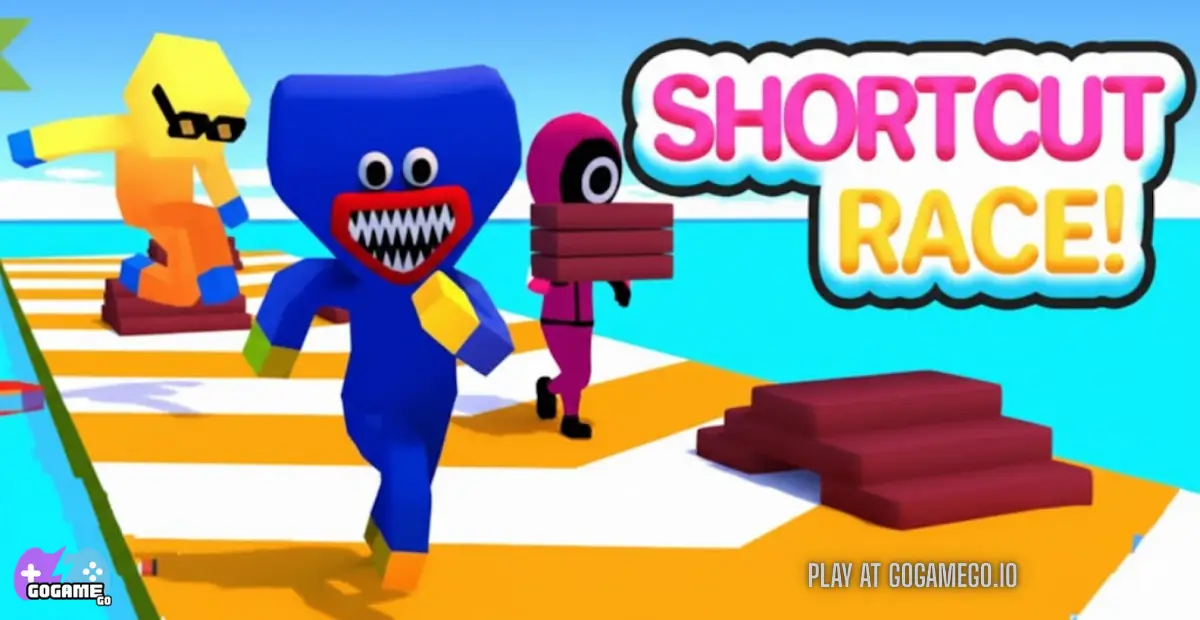
Shortcut Race is a bright, fast, kid-friendly running game where players collect planks and use them to build their own shortcuts across water, ramps, and gaps. Instead of following the normal track, you can drop boards under your feet and zip past every other racer. It’s simple, fast, and full of clever little moments where the smartest path wins—not just the fastest runner.
The game was created by the casual-game studio YAD, a developer known for making colorful, easy-to-play web and mobile games for kids. They focus on quick, creative gameplay, and Shortcut Race quickly became one of their most recognizable titles. Since its release in 2021, the game has received small updates across various platforms, improving its level layouts and making controls smoother for young players on mobile and browser.
What makes Shortcut Race stand out is its clever mix of racing and strategy. Kids love scooping up piles of planks, building tiny bridges over water, and surprising everyone by creating a secret path straight to the finish line. Every round feels different because every shortcut is player-made.
It’s trending right now because it blends quick action with simple thinking: collect, build, and boost ahead. The game is also free and unblocked on gogamego.io, which makes it super popular in classrooms, cafés, and anywhere kids want a quick racing challenge they can jump into instantly.
Gameplay Overview
How to Play
In Shortcut Race, your goal is simple: reach the finish line before everyone else. But the real trick is choosing when to run normally and when to drop planks to build a shortcut. As you sprint along the track, you collect colorful boards scattered everywhere. The more you gather, the longer and faster the shortcut path you can create.
Each match is a quick race filled with curves, floating platforms, and water zones that slow down anyone who doesn’t have enough planks. Players rise through the levels by completing races, earning in-game coins, unlocking new character skins, and improving their racing skills. The higher you climb, the trickier the track layouts become, encouraging kids to think ahead and plan the best bridge-building moment.
Controls
1-Player (Keyboard):
- Mouse / Hold & Drag: Move your runner left or right
- Automatic Running: Your character always runs forward
2-Player (If supported on your version):
- Player 1: Mouse to move
- Player 2: Arrow Keys / A-D keys (varies by platform)
Mobile Touch Controls:
- Hold your finger on the screen to move
- Slide left or right to change lanes
- Release to stop moving temporarily
Pro Tips
- Collect before you build: Don’t place planks too early—save them for big shortcuts.
- Cut corners smartly: Angling your bridge diagonally makes the shortcut shorter and faster.
- Block opponents: Build a path right in front of them to force slowdowns or falls.
- Avoid water traps: Never step into water without planks—you’ll slow down instantly.
- Watch other players: Follow their shortcuts when you’re low on planks.
- Pick high-traffic lanes: More players = more dropped planks to steal.
- Upgrade skins (if available): Visual skins don’t just look cool—they help you track your character easier.
- Stay calm in tight turns: Rushing can make you miss big plank piles.
- Plan the final shortcut: Save enough planks for a huge final bridge to skip the last curve of the track.
Key Features
Shortcut Race shines because it mixes clever thinking with fast, kid-friendly action. Every round gives players a fresh chance to outsmart rivals using quick moves and creative shortcuts, making it one of the most replayed racing games on gogamego.io.
- Smart Shortcut System: Collect planks and drop them to build your own bridge. Kids learn strategy as they decide the perfect moment to create a shortcut and jump ahead.
- Fast & Simple Races: Short levels keep the game exciting and easy to replay. Perfect for quick fun during breaks or free time.
- Colorful 3D Tracks: Bright visuals and smooth animations make the game feel playful and welcoming for younger players.
- Progression & Rewards: Unlock new skins and reach higher levels, giving kids goals to chase and reasons to keep improving.
- Cross-Platform Play: Enjoy the full game in any browser on PC, tablet, or mobile. No installs, no sign-ups—just instant fun.
- Easy Controls for All Ages: Drag to move, run automatically, and build shortcuts with a tap. Even first-time players pick it up in seconds.
- Replayability: Every race plays out differently depending on where you build your shortcuts, keeping the experience fresh and exciting.
- Kid-Safe, Unblocked Gameplay: Free and playable at school or home, making it a favorite on children’s gaming platforms.
Game Modes
Shortcut Race keeps things exciting by offering several fun ways to play, giving kids the freedom to race alone, challenge friends, or join bigger competitions depending on the platform they’re using. Each mode keeps the core shortcut-building idea but adds its own twist to the experience.
Solo Mode: This is the most common way to play. You race against AI runners while collecting planks, building shortcuts, and mastering the track. Difficulty increases gradually, with faster opponents and trickier layouts at higher levels. Players earn rewards like coins, character skins, and progression trophies. Solo mode is perfect for practicing strategies and learning when to build bridges or save planks.
Multiplayer Mode: Some versions of Shortcut Race include online matchmaking where players face real opponents from around the world. Races become more unpredictable since human players make bold shortcuts and unexpected moves. Winning multiplayer races often gives better rewards and adds extra excitement when competing for the top spot.
Local Co-op: In browser versions that support split controls, two players can share the same device. One uses the mouse while the other uses keyboard controls. This mode turns the game into a fun challenge between siblings or friends, encouraging teamwork, friendly competition, and lots of laughs.
Tournament or Seasonal Modes: Depending on the platform, players can join limited-time events featuring unique levels, special skins, or leaderboard challenges. These modes reward active players with exclusive bonuses while keeping the game fresh and motivating kids to come back for new seasonal surprises.
Characters & Customization
Characters
While Shortcut Race focuses on fast-paced racing, it also gives kids a fun lineup of playful characters and skins that bring personality to every match. Each one feels unique, letting players express their style as they sprint and build shortcuts.
- Speed Runner: A bright, athletic character known for smooth animations and clean movements. Great for kids who love simple, classic designs.
- Robo Racer: A shiny robot skin with glowing accents. Its bold colors make it easy to spot during busy races, especially in chaotic shortcut moments.
- Ninja Jumper: Dressed in fast, stealthy gear, this character adds a cool sense of mystery. Kids love its sharp look and quick-feeling movements.
- Rainbow Kid: A cheerful character covered in bright, shifting rainbow patterns. Perfect for younger players who want something fun and colorful.
- Super Skater: A stylish skin with sporty vibes, inspired by street racing and skate culture. It stands out with vibrant patterns and smooth animations.
Customization
Customization in Shortcut Race helps kids create a racer that truly feels like their own. Players can unlock new outfits, color variations, and themed skins by completing races or earning coins. Some skins offer unique victory animations, making each win feel extra satisfying.
Kids can switch between bold neon styles, cute character designs, sporty outfits, or futuristic robotic themes. While the game keeps upgrades cosmetic-only (so every player stays balanced), customizing your racer makes it easier to spot yourself in a busy race and adds extra excitement when unlocking something new.
Whether it’s changing colors, choosing a funny outfit, or showing off a brand-new skin, customization gives every shortcut racer a chance to shine in their own style.
Special Moves & Combos
Even though Shortcut Race keeps its controls simple for kids, the game includes several smart moves and combo techniques that skilled players use to win more races. These tricks make the gameplay deeper, giving players ways to outsmart opponents rather than relying only on speed.
- Diagonal Shortcut Drop: Instead of building straight ahead, angles let you cross water using fewer planks. Strategy: Use this when you’re low on planks or want the fastest path to curve around corners.
- Late Bridge Snap: Build your shortcut at the last possible moment to surprise opponents behind you. Strategy: Wait until they commit to the main track, then cut across cleanly to steal the lead.
- Lane Sweep Collect: Move left to right quickly to gather multiple plank piles in one pass. Strategy: Use this early in the race to build a huge plank stack for a powerful shortcut later.
- Shadow Follow: Tail another player and use their shortcut once they build it. Strategy: Perfect for conserving planks when saving up for a final sprint.
- Turbo Cutback: Build a sharp shortcut back to the main track just ahead of your rivals. Strategy: This disrupts their movement and forces them to slow down or fall.
- Water Skip Boost: Start your shortcut right as you enter shallow water to avoid losing speed. Strategy: Great for levels with long blue water zones designed to slow players down.
- Final Dash Shortcut: Save 20–30 planks for the very end of the race. Strategy: Build a massive final shortcut to skip the last curve and jump straight to the finish line.
- Bridge Bump Block: Build a path right in front of another player to make them fall off. Strategy: Works best when racing side-by-side near narrow track edges.
Using these special moves and combos at the right moment can turn a close race into an easy win, helping kids master the smart shortcut style that makes the game so much fun.
Tips & Tricks
Winning in Shortcut Race isn’t just about running fast—it’s about thinking ahead, timing your shortcuts, and understanding how your planks can change the entire track. These tips help kids (and even grown-ups) master every race with smart strategies that make each run more fun and rewarding.
- 1. Collect Big Early: Build up your plank stack at the start. Early shortcuts waste resources—save them for tricky sections.
- 2. Follow the Leaders: When you’re low on planks, stay behind opponents and use their bridges. It saves time and resources.
- 3. Angle Your Shortcuts: Diagonal bridges use fewer planks and get you across water faster than straight paths.
- 4. Stay Near the Edges: The track edges often hide extra planks that fast players miss. Great for stacking up quickly.
- 5. Watch Opponents’ Plank Counts: If someone has a huge stack, expect a big shortcut. Prepare to counter or copy it.
- 6. Delay Your Build: Place planks at the last second to catch players off-guard and avoid giving them easy paths to copy.
- 7. Use Water Zones Wisely: Don’t enter water without planks—speed drops instantly. Always build, even if it’s just a short bridge.
- 8. Collect in Sweeps: Move side-to-side while running to gather multiple plank piles in one pass.
- 9. Save a Final Burst: Always keep 15–25 planks for the last turn. A giant final shortcut can steal the win even from far behind.
- 10. Block Smartly: Build a bridge sharply in front of another player to make them fall off or slow down.
- 11. Study Track Layouts: Some levels have hidden shortcut angles. Memorizing them gives you an instant advantage.
- 12. Stay Calm in Plank-Heavy Zones: Don’t rush—stacking neatly helps you control movement and react better to opponents.
Combine these tricks and you’ll turn every race into a cleverly planned victory, making your shortcuts faster, smarter, and way more fun.
Platforms & Technology
Shortcut Race runs smoothly right in your browser thanks to modern HTML5 and WebGL technology. This means no downloads, no plugins, and no setup—just click and play instantly on gogamego.io. The game is fully compatible with Chrome, Firefox, Edge, Safari, and most school-safe browsers.
On desktop, players enjoy easier lane control with mouse movement, which helps with sharp turns and collecting more planks. On mobile or tablet, simple touch controls make the gameplay feel natural and smooth, perfect for younger kids who prefer sliding their finger across the screen.
The lightweight engine ensures fast loading times and stable framerates, even on older devices. For the best performance, keep your browser updated, close unused tabs, and switch to fullscreen mode to reduce lag. Whether you're racing on a PC, Chromebook, iPad, or phone, Shortcut Race stays crisp, colorful, and responsive every time.
Can I Play Shortcut Race Unblocked?
Yes! You can play Shortcut Race unblocked anytime and anywhere—at school, at work, or at home—right on gogamego.io. The game runs directly in your browser with zero restrictions, making it one of the easiest and safest ways for kids to enjoy fast racing fun without worrying about blocked networks.
Because it’s powered by lightweight HTML5 technology, there are no downloads, no installs, and no extra steps. Just tap or click “Play” and you’re instantly racing. Many players also love that the game runs cleanly with no pop-up ads to interrupt the action, keeping the focus on collecting planks and building clever shortcuts.
Whether you’re sneaking in a quick race on a school Chromebook, killing time during a break at work, or relaxing at home, Shortcut Race unblocked is always ready. Smart shortcuts, fast races, and quick fun—accessible with one click on any device.
Similar Games
Love the fast, sneaky shortcuts in Shortcut Race? Here are more free running and racing games on gogamego.io that feel just as quick, clever, and fun for kids.
- Parkour Race – Sprint across rooftops, jump between buildings, and find parkour-style shortcuts to beat other runners to the finish.
- Temple Run 2 – Dash, slide, and jump through ancient temples while escaping a giant monster and grabbing shiny coins.
- Run 3 – Guide a tiny alien through space tunnels, running on walls and floors in a gravity-bending endless runner.
- Electron Dash – Race through glowing sci-fi tunnels, dodge lasers, and time your jumps to stay on the path.
- Ovo Online – A slick parkour game where you run, flip, and wall-jump through tricky obstacle courses.
- Smash Karts Unblocked – Hop into a kart, race around crazy arenas, and blast rivals with wild power-ups.
- Highway Racer 3D – Speed through busy traffic, weave between cars, and chase high scores on endless highways.
- Drive Mad – Balance your monster truck across wobbly bridges and ramps without flipping over.
- Subway Surfers – Run along train tracks, dodge obstacles, and surf across rooftops in a colorful endless chase.
Game History & Updates
Shortcut Race first appeared online as an easy-to-play web game around early 2022, becoming popular for its simple yet exciting shortcut-building racing mechanics.
Since then, it’s seen a few notable updates: new plank types and track designs were unlocked as players progressed through levels, giving more variety and replay value. The game’s HTML5 engine and browser-based design helped it stay stable and accessible as more children and casual gamers discovered it.
As the community grew, more fans started sharing shortcut strategies and tricks online — discussing how to use planks, plan shortcuts, or try new ways to reach the finish first. That rising interest helped boost the game’s popularity on many free-game portals.
Looking ahead, it’s expected that future rounds may introduce new track themes, additional bridge types, cosmetic skins, and perhaps more level variations to keep the excitement alive. While no official “roadmap” is published yet, the steady updates and community interest suggest ongoing growth for Shortcut Race — ideal for kids and casual players who love improving and competing again and again.
FAQ
Is Shortcut Race free to play?
Yes! Shortcut Race is completely free on gogamego.io. There are no downloads, no sign-ups, and no hidden fees—just instant racing fun.
Can I play Shortcut Race unblocked at school?
Absolutely. The game runs directly in your browser using HTML5, so it works on most school Chromebooks and networks with no restrictions.
How do I collect planks faster?
Move in smooth left-to-right sweeps to grab multiple piles at once. Staying on outer lanes also helps you spot bigger plank clusters.
What devices support Shortcut Race?
You can play on desktop, laptop, mobile, and tablets. The game supports both keyboard/mouse and touch controls for easy play on all devices.
Why do some players seem faster?
Usually because they collect more planks early and use smart diagonal shortcuts to cut across the map. Mastering shortcut timing gives you a big speed advantage.
Is there multiplayer in Shortcut Race?
Some versions offer online or local competitive modes. On browser versions, gameplay is mainly single-player against AI, but still highly competitive and fun.
How do I unlock new characters or skins?
Most skins unlock as you complete races, earn coins, or progress through levels. Kids enjoy collecting colorful outfits to personalize their racer.
Why do I slow down in the water?
Water zones reduce running speed unless you build a plank bridge over them. Always save a few planks for water sections to avoid losing your lead.
Can I play Shortcut Race on mobile?
Yes! Touch controls work smoothly on phones and tablets. Just swipe to move left or right and enjoy the same shortcut-building action.
How do I win more races?
Focus on collecting planks early, take diagonal shortcuts, save a final big shortcut for the end, and follow opponents’ bridges when running low.
Conclusion
Shortcut Race delivers fast, clever, kid-friendly racing that keeps players excited from the very first plank they pick up. Its unique mix of running, strategy, and shortcut-building makes every round feel fresh, giving children the perfect balance of action and thinking. With simple controls, bright visuals, and quick races, it’s easy for beginners to learn yet satisfying for skilled players who love mastering new shortcuts and smart tricks.
Because it’s free, unblocked, and instantly playable on any device, the game has become a favorite choice for school breaks, home playtime, and fun gaming sessions with friends. Kids enjoy experimenting with bold shortcuts, unlocking colorful skins, and surprising their opponents with clever moves—turning every match into a fun adventure.
If you’re ready to jump into a game where strategy meets speed, head over to gogamego.io and start your first race today. Build your shortcut, outsmart every runner on the track, and discover why Shortcut Race has become one of the most exciting free racing games online. Click play and race your way to victory—your shortcut journey begins now!