
GunSpin
Similar Games




Description
Introduction
Get ready to spin, shoot, and fly across the sky with GunSpin, one of the most exciting free online games for kids.
This fun shooting physics game lets you blast a gun to push yourself forward, testing how far you can go with clever timing and smart upgrades.
On gogamego.io.io, you can play GunSpin unblocked instantly—no downloads, no ads, just pure action anytime you want.
It’s not just about shooting; it’s about using angles, momentum, and upgrades to break records. That’s why kids love it both at school and at home.
Ready to see how far your shots can take you? Start playing GunSpin online right now and enjoy endless fun for free.
What Is GunSpin?
GunSpin is a fun physics-based shooting game created by the popular indie developer Maxim Karpenko, the same mind behind other creative titles loved by kids around the world.
The game was first released in 2020 and has since gained updates that improved its smooth controls and added more unique weapons for players to test. Each update has kept the game fresh and exciting, making it one of the most played free browser games for kids.
What makes GunSpin online special is its simple but addictive idea: you fire your gun not to hit enemies, but to launch yourself across the map. Every shot pushes you farther, and with smart upgrades, you can travel amazing distances. This playful twist makes it stand out from other shooting games.
Another reason GunSpin unblocked is trending is its easy access. You can play right in your browser, with no download required. Kids love the challenge of beating their own high scores and sharing them with friends at school or at home.
Its mix of fast action, fun upgrades, and endless replay value explains why GunSpin remains one of the most popular free online games today.
Gameplay Overview
How to Play
In GunSpin, the goal is simple but super fun: fire your gun to launch yourself as far as possible. Instead of shooting enemies, you shoot the ground or the air to push your character forward.
Each run starts with a basic weapon. As you keep moving, you collect coins and rewards that let you unlock stronger guns. Every upgrade helps you fly farther, making the challenge even more exciting.
The game progression is endless. There are no complicated levels, but the thrill comes from setting new distance records, unlocking powerful weapons, and testing how far your shots can take you. It is what makes GunSpin online one of the most addictive physics shooting games.
Controls
1-Player Mode:
- Press the left mouse button to fire your gun and move forward.
- Time your shots carefully to get the best distance.
2-Player Mode: Some versions allow players to take turns and compete for the farthest shot, making GunSpin unblocked a fun classroom or family challenge.
Touch Controls (Mobile): Simply tap the screen to fire. The mobile version is smooth, so kids can enjoy GunSpin free play anytime on phones or tablets.
Pro Tips
- Time every shot: Don’t just spam clicks; shoot at the right angle to maximize distance.
- Use upgrades wisely: Save coins for the guns that give the biggest boost.
- Aim low early on: Shooting slightly downward helps build momentum.
- Watch your speed: Firing too fast can waste bullets.
- Experiment with angles: Try different shooting directions to see what works best.
- Track your records: Push yourself to beat your own high score each time.
- Switch weapons often: Some guns work better at long distances than others.
- Play unblocked at school: Compete with friends for the longest run and share scores.
Key Features
- Simple Controls: Just click or tap to fire your gun. Kids can start playing GunSpin online right away without learning complicated rules.
- Physics-Based Fun: Every shot uses real momentum, making the game feel exciting and unpredictable. This adds endless replay value as no two runs are the same.
- Wide Range of Weapons: Unlock pistols, shotguns, and even futuristic blasters. Each gun changes how far you can fly, keeping the gameplay fresh.
- Upgrade System: Collect coins to improve your weapons. Upgrades make every run more powerful, encouraging kids to push their limits.
- Unblocked Access: GunSpin unblocked works at school, at home, or anywhere. No downloads, no ads—just instant fun in your browser.
- Cross-Platform Play: Works smoothly on PC, laptop, and mobile devices. Touch controls make it perfect for playing on the go.
- Endless Challenges: With no final level, the goal is always to beat your last record. This makes GunSpin free play a game kids return to every day.
- Competitive Fun: Take turns with friends to see who can go the farthest. It adds a social twist that makes the game even more popular.
Game Modes
GunSpin may look simple at first, but it gives players different ways to enjoy the challenge. Whether you like to beat your own record or compete with friends, the game offers flexible modes that keep it fun and fresh.
Solo Mode: This is the classic way to play. You fire your gun, fly forward, and see how far you can travel. The difficulty grows as you aim for longer distances, and the rewards come in the form of coins to unlock new weapons. Kids love this mode because it’s easy to start yet hard to master.
Multiplayer Mode: While GunSpin online doesn’t have built-in matchmaking, many players turn it into a friendly competition. You and your friends can each play on your own devices and compare high scores. It’s a simple way to create your own online challenge.
Local Co-op: Some versions allow players to take turns on the same computer or device. This makes GunSpin unblocked perfect for classrooms or family fun, since kids can compete side by side without needing extra setups.
Tournament Play: Communities often organize mini-tournaments where players try to beat each other’s records. Seasonal challenges or school contests make GunSpin free play even more exciting, turning a simple physics game into a social event.
Characters & Customization
Characters
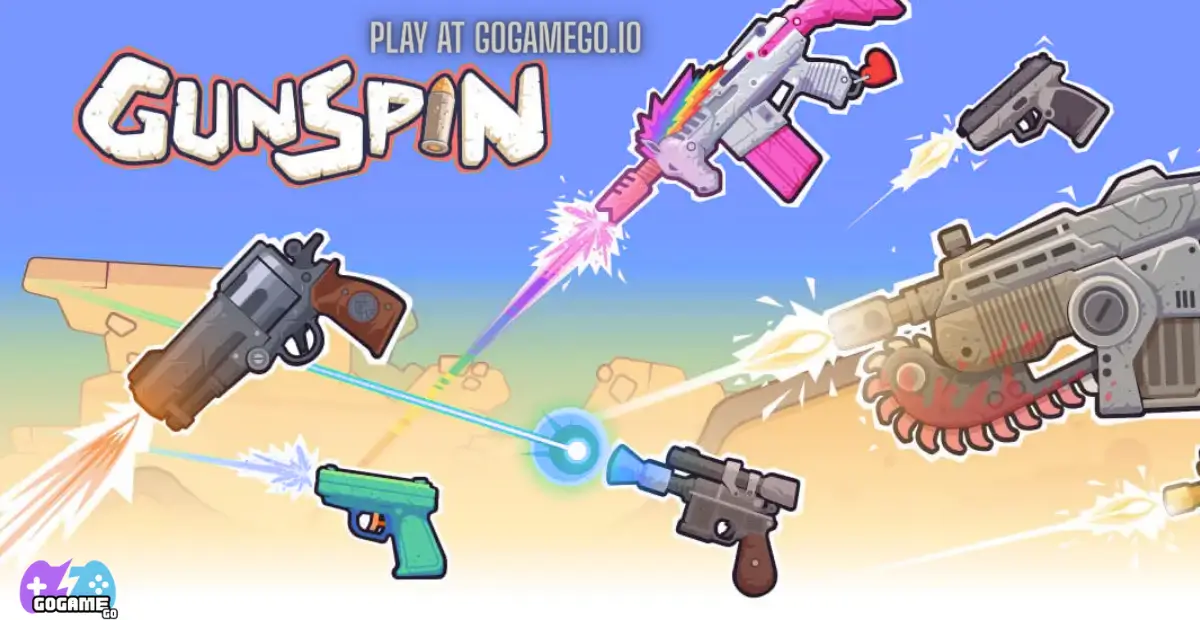
Unlike many action games, GunSpin doesn’t use classic heroes or villains. Instead, the “characters” are represented by the wide range of weapons you can unlock. Each gun feels unique and gives players a new way to travel across the map.
- Pistol: The starter weapon—lightweight and simple, perfect for beginners learning the basics.
- Shotgun: Fires with a strong blast, pushing you forward with powerful momentum.
- Rifle: Balanced power and accuracy, great for steady distance gains.
- Machine Gun: Fast bursts that keep you moving smoothly across the level.
- Laser Gun: A futuristic weapon with high precision, making long runs possible.
- Rocket Launcher: Massive impact, sending you flying far when timed correctly.
Customization
What makes GunSpin online exciting is how you can customize your runs. Instead of changing outfits or skins, the upgrades focus on weapons and gear.
Players can upgrade damage, speed, and ammo capacity, making each shot more powerful. Coins collected during runs are used to unlock new guns or enhance existing ones, creating endless ways to play.
On mobile and browser versions, kids enjoy experimenting with different weapons, colors, and firing styles. This system of progression acts like a customization tool, giving every player a sense of personal strategy in GunSpin unblocked.
Special Moves & Combos
While GunSpin doesn’t have fighting combos like other arcade games, the real skill comes from mastering special shooting moves. These strategies help kids push their distance further and unlock higher scores in GunSpin online.
- Angle Boost: Fire slightly downward at the start to build quick momentum. This move helps you cover more ground early.
- Double Tap Combo: Time two quick shots close together. It gives you a burst of speed without wasting too much ammo.
- Mid-Air Lift: Shoot upward while falling to stay airborne longer. This is a must-know move for long runs.
- Ground Slam: Fire directly at the ground to bounce forward with extra force. Works great with heavy weapons like the shotgun.
- Ammo Saver Combo: Don’t shoot nonstop—wait for the right angle before firing. This strategy makes every bullet count.
- Chain Momentum: Combine downward and forward shots in rhythm. It creates a rolling effect that keeps you moving smoothly.
- End-Game Push: Save a few bullets for the final stretch. A well-timed last shot can break your personal record.
By mixing these special moves, kids can create their own unique combos. That’s why GunSpin unblocked is more than just clicking—it’s a strategy game where smart timing beats random shooting every time.
Tips & Tricks
Getting better at GunSpin isn’t just about clicking fast. With the right strategies and smart timing, you can travel much farther and unlock stronger weapons. Here are the best tips to master GunSpin online and beat your high score.
- Master your angles: Shoot slightly downward at the start to build momentum, then adjust as you go.
- Don’t waste ammo: Wait for the right moment instead of firing nonstop. Every bullet matters in GunSpin unblocked.
- Use momentum combos: Chain shots in rhythm—down, forward, up—to keep moving smoothly.
- Save coins for upgrades: Focus on power and ammo upgrades before unlocking new guns.
- Test each weapon: Every gun has unique traits. Try them all to see which one fits your style best.
- Stay airborne: Shooting upward while falling gives you extra distance and avoids losing speed.
- Plan your last shots: Keep ammo for the final stretch to push your score even higher.
- Switch strategies often: What works with a pistol may not work with a rocket launcher—adapt to your weapon.
- Play on mobile: Touch controls are smooth, making it easy to practice anywhere.
- Challenge friends: Competing with others adds fun and makes you improve faster.
- Track your progress: Aim to beat your personal record each session to stay motivated.
- Enjoy the game: Don’t rush—GunSpin free play is about experimenting and having fun.
Platforms & Technology
GunSpin runs directly in your browser, so it works smoothly on popular platforms like Chrome, Safari, Edge, and Firefox. That means kids can enjoy GunSpin unblocked without worrying about downloads or installations.
On desktop, the game feels precise with mouse controls, perfect for players who like aiming with accuracy. On mobile, touch controls make it easy to tap and shoot on the go, turning GunSpin online into a quick game for breaks or school free time.
The game is built with modern web technology like HTML5 and WebGL, which ensures fast loading, smooth graphics, and compatibility across devices. It doesn’t require extra plugins, so it’s safe and accessible for kids.
Performance Tips: Close unused tabs to make the game run faster, and play in full-screen mode for the best experience. Whether on a phone, tablet, or PC, GunSpin free play stays fun and responsive.
Can I Play GunSpin Unblocked?
Yes! You can enjoy GunSpin unblocked anytime, whether you’re at school, work, or relaxing at home. Because it’s a browser-based game, there are no downloads, no tricky setups, and no extra apps required.
One of the best parts of GunSpin online is that it’s free from distracting ads, letting kids focus on the fun challenge of firing and flying. This makes it safe and easy to play in classrooms during breaks or at home on any device.
Simply visit gogamego.io, click to start, and experience the thrill of GunSpin free play instantly. It’s quick, unblocked, and always ready for your next high-score run!
Similar Games
If you enjoy the unique physics and addictive challenge of GunSpin, you’ll love these other games available on gogamego.io. Each one offers exciting mechanics, fun upgrades, and hours of free play.
- Tank Trouble — A classic shooting game where you control a tank in tricky mazes. Use strategy and quick shots to outsmart your opponents.
- Short Life — A hilarious physics-based platformer where timing and careful moves are key to survival.
- Cube 2048 IO — A mix of physics and puzzle gameplay, where merging cubes leads to big scores and endless fun.
- Solar Smash — A creative destruction game that lets you experiment with weapons to destroy planets in stunning detail.
- Five Nights at Freddy’s (FNaF) — A spooky but fun survival challenge where you test your nerves against animatronic characters.
Game History & Updates
GunSpin was first released in 2020 by indie developer Maxim Karpenko, known for creative physics-based games. The simple idea of shooting a gun to fly across the map quickly caught kids’ attention, making it one of the most popular free browser games.
Over time, the game received updates that added new weapons, improved performance, and made controls smoother. These small patches kept GunSpin online fresh and enjoyable, ensuring players always had new tools to test out.
The community around GunSpin unblocked grew fast, especially in schools and gaming forums. Kids love to share their longest distances, favorite weapon combos, and high scores with friends. This social aspect helped the game spread even more.
As for the future, fans often hope for new guns, challenges, or seasonal events to make the game even bigger. While there’s no official roadmap, the popularity of GunSpin free play suggests it will stay a favorite physics shooting game for a long time. Its mix of upgrades, records, and easy access keeps both new and returning players excited.
FAQ Section
Is GunSpin free to play?
Yes! GunSpin is completely free. You can play instantly on gogamego.io with no downloads or hidden costs.
Can I play GunSpin unblocked at school?
Absolutely. GunSpin unblocked works in school browsers, letting kids enjoy it during breaks without restrictions.
How do I control the game?
On PC, click the left mouse button to fire. On mobile, tap the screen. The controls are simple and easy for kids of all ages.
What is the main goal in GunSpin?
The goal is to shoot your gun and see how far you can travel. Longer distances mean more coins, better upgrades, and higher scores.
How do I unlock new weapons?
Collect coins while playing. These coins let you buy upgrades and unlock powerful new guns like shotguns, rifles, and even rocket launchers.
Does GunSpin have multiplayer?
While it doesn’t have online matchmaking, kids often compete by comparing high scores with friends. Some versions also allow turn-based play.
What devices can I play on?
You can enjoy GunSpin online on desktops, laptops, tablets, and mobile phones—any device with a modern browser.
Are there any ads in GunSpin?
On gogamego.io, there are no annoying ads. You get smooth, safe gameplay every time.
Is GunSpin safe for kids?
Yes, the game is kid-friendly. It’s cartoon-style, non-violent, and focuses on fun physics rather than battles.
Can I play GunSpin offline?
No, GunSpin free play needs an internet connection since it’s a browser game. But it loads quickly, even on mobile data.
Conclusion
GunSpin is more than just a simple shooting game—it’s a physics adventure where every click pushes you further, every upgrade makes you stronger, and every run gives you a new chance to beat your record. With its easy controls, exciting weapons, and endless replay value, it’s no surprise that GunSpin online has become a favorite for kids around the world.
Because it’s free, unblocked, and available on any device, you can enjoy GunSpin at school, at home, or anywhere you like. No downloads, no ads—just instant fun and a chance to test your shooting skills uniquely.
Whether you’re chasing a new high score, competing with friends, or simply enjoying the challenge of flying farther each time, GunSpin free play guarantees hours of entertainment. The mix of strategy, timing, and upgrades makes it a game you’ll want to play again and again.
Ready to take your best shot? Click “Play” on gogamego.io and start your GunSpin unblocked adventure today!